
Case study
Making a broad HR offer easier to choose.
A startup looking for HR support has a particular problem to solve. This firm’s expertise covered several needs, but its website presented them through one broad page. We gave buyers two ways to find relevant help: choose a service, or start with the problem.
One page can cover everything your business offers. But how closely it answers a specific buyer’s need…
- Can each buyer find the service they need?
- Do our services need different explanations?
- Is one page trying to answer too much?
- Are the questions specific to each service?
- Can buyers see relevant proof?
- Is the next step clear on each service page?
- What did the separate pages make clearer?
- How many searches showed the site before?
- What were the starting numbers?
- Did clicks grow as much as search appearances?
- What do these figures leave unanswered?
- Is our website facing the same problem?
The starting point
Several reasons to hire the firm. One broad explanation.
Hiring a first team, setting pay bands and handling an employee issue call for different conversations. This fractional HR firm supported startups and scaleups across all of them. Its one-page website brought that expertise together, but buyers had to work out where their particular need fitted.
We rebuilt the service navigation around those decisions. The aim was straightforward: show the range of the offer, name the relevant help and give each buyer a useful place to start. The client is unnamed by agreement.
Choose by service
Bring the full range of expertise into view.
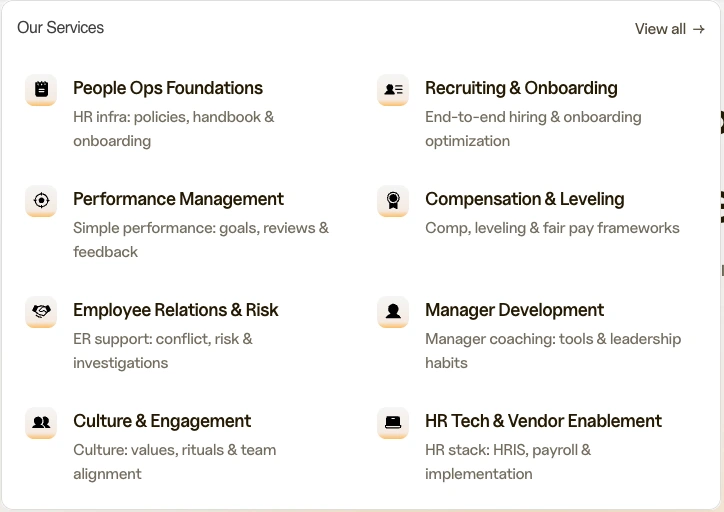
The menu gives buyers eight named choices: People Ops Foundations; Recruiting & Onboarding; Performance Management; Compensation & Leveling; Employee Relations & Risk; Manager Development; Culture & Engagement; and HR Tech & Vendor Enablement.
Someone looking for compensation support can recognize that service immediately. Someone comparing the firm’s wider capabilities can see how the services fit together. The navigation gives each area of expertise a distinct place in the offer.
Choose by problem
Meet the buyer where the question starts.
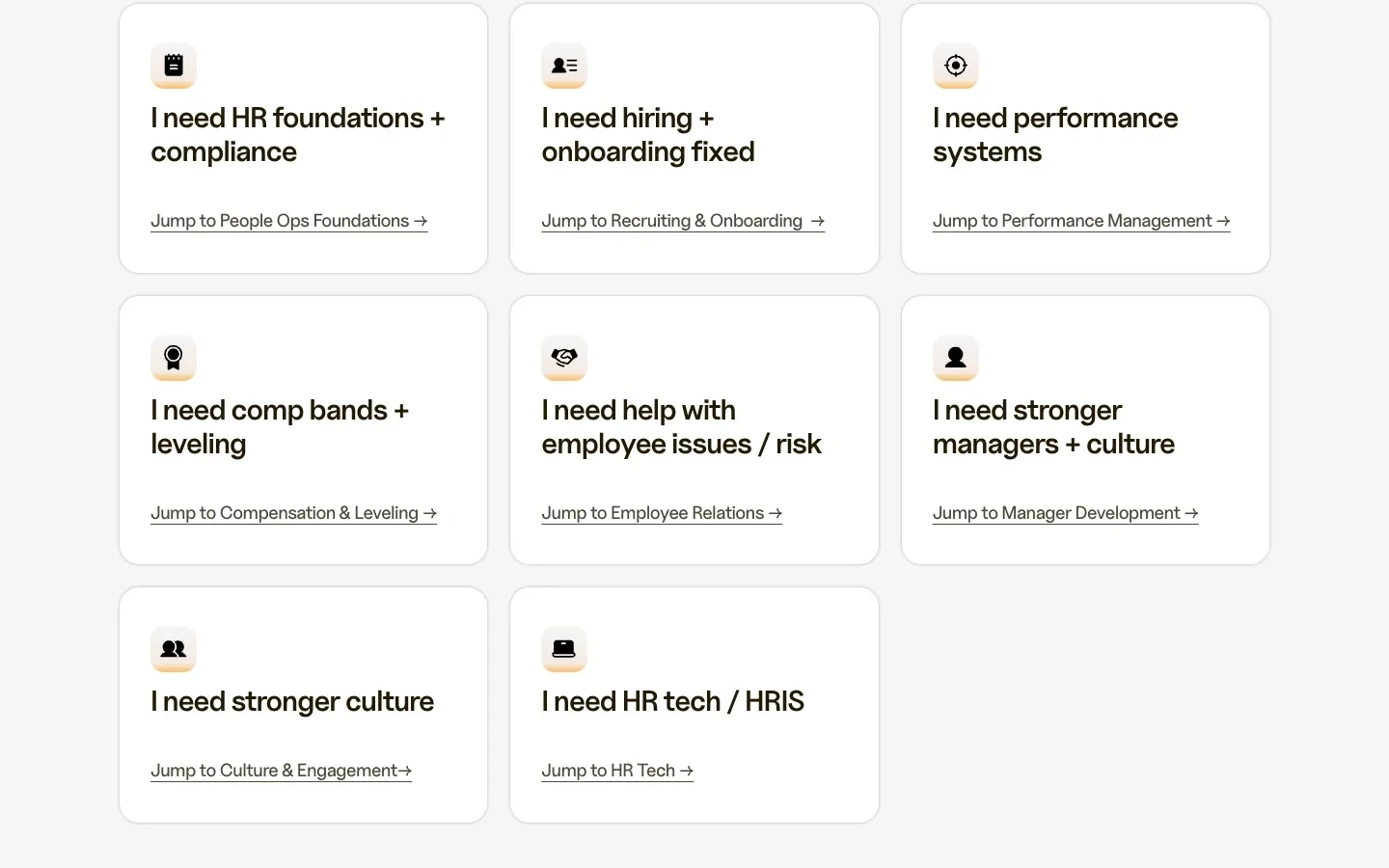
A buyer may know they need to hire well before they know which HR service to ask for. The chooser starts with that situation and points to Recruiting & Onboarding. Pay bands and leveling lead to Compensation & Leveling. Employee issues and risk lead to Employee Relations.
The other choices cover foundations, performance, managers, culture and HR technology. Buyers can enter through the problem they recognize, then explore the relevant service. This connects the firm’s expertise to the language of the buying decision.
Read the choices
Two ways to find the same expertise.
The service menu names the work. The chooser starts with the situation a buyer recognizes. These are the eight pairings shown in the chooser above.
| Buyer wording shown | Service label shown |
|---|---|
| I need HR foundations + compliance | People Ops Foundations |
| I need hiring + onboarding fixed | Recruiting & Onboarding |
| I need performance systems | Performance Management |
| I need comp bands + leveling | Compensation & Leveling |
| I need help with employee issues / risk | Employee Relations |
| I need stronger managers + culture | Manager Development |
| I need stronger culture | Culture & Engagement |
| I need HR tech / HRIS | HR Tech |
The chooser uses shorter labels for Employee Relations and HR Tech than the full service menu. Both entry points make the relevant area of expertise visible. The principle to apply to your own website is the relationship: do the words buyers use and the services you name point toward the same help?
Start with a real question your team hears before a sale. Match it to the service that addresses it, then check whether that service’s explanation makes the scope and next step clear. Use your own offers and buyer questions; the eight choices belong to this firm’s work.
Recorded search results
More daily search visibility in the later period.
The firm’s Google Search Console record shows higher daily impressions and clicks in July to September than in January and February 2026. Daily impressions averaged 68.6 compared with 13.4, while daily clicks averaged 0.66 compared with 0.22.
The Google search picture
Google impressions a day, rounded
- 1 January to 28 February 2026, 59 days
- 13
- 1 July to 26 September 2026, 88 days
- 69
Google clicks a day
- 1 January to 28 February 2026, 59 days
- 0.22
- 1 July to 26 September 2026, 88 days
- 0.66
From the client’s Google Search Console, Web Search. Daily averages for the dates shown, captured 2 October 2026.
The comparison covers 59 and 88 days. Visibility fluctuated between them, including 207.3 impressions a day in April. These figures describe search activity, not enquiries or sales, and do not isolate the effect of individual changes.
The numbers behind the comparison
The dates, the totals and the daily averages.
Earlier: 1 January to 28 February 2026. Later: 1 July to 26 September 2026. We use daily averages to account for the different period lengths.
| Recorded measure | Earlier | Later |
|---|---|---|
| Days | 59 | 88 |
| Google impressions | 793 | 6,033 |
| Google clicks | 13 | 58 |
| Impressions per day | 13.4 | 68.6 |
| Clicks per day | 0.22 | 0.66 |
Source: the client’s Google Search Console summary, Web Search, property totals, captured 2 October 2026. Dates follow Pacific Time. The original record is kept privately under the client’s confidentiality agreement. About Google’s search metrics.
What this could mean for your website
Has your expertise outgrown how your website explains it?
If your business solves several distinct problems, buyers need to see where their own need fits. Look at your main service page: can someone recognize the right help, understand its scope and see a useful next step?
That is the decision this rebuild addressed. The eight-choice menu belongs to this HR firm. Your answer might be a stronger existing page, a clearer service structure or a rebuild around the business you have become.
For your own site, use the repair-or-rebuild decision record to compare the work against a specific requirement. If replacement is justified, use the rebuild preservation pack to record what stays and what needs checking.
For a planning example you can apply to your own practice, read our SEO guide for HR consultants. It separates employer-facing advisory services from recruitment and software searches.
See our website rebuild scope or how the ongoing AI SEO plan works. To start with your own website, get your free Outside View.
Frequently Asked Questions
What did you change in this HR advisory rebuild?
We reorganized how the firm presented its HR support. An eight-choice service menu makes the range of expertise visible, while a problem-based chooser points buyers toward relevant help with hiring, compensation, employee issues and other needs.
Our website already looks good. Could it still need this work?
Yes. A polished website can leave buyers doing too much work to find the right service. We look at how clearly it explains who each service is for, which problem it solves and what to do next.
Does every service need its own page?
Start with the decisions buyers need to make. Different audiences, scope or buying questions may justify separate pages. Closely related services may work better together. The aim is a useful choice at each step.
What happens after the website is rebuilt?
The work shifts to learning from the site: which searches bring people in, which services attract interest and what the enquiries tell us. Our ongoing plan uses those observations to choose the next improvements.
Could this approach help our service business?
If your website compresses several useful services into one broad explanation, start with a free Outside View. We assess how your business comes across, so the next conversation begins with your actual website and priorities.
Help buyers recognize the expertise you already have.
Send us your website for a free Outside View. We’ll assess how your business comes across, then use the Clarity Call to discuss where to focus.