
AI visibility content is where cannibalization spreads fastest.
The labels overlap:
- AI SEO
- AEO
- GEO
- LLM visibility
- AI Overviews
- ChatGPT Search
Weak teams respond by publishing a separate page for every label. Then they wonder why five URLs all answer the same question, use the same promise, and push the same call to action.
That is not topical authority. That is internal competition.
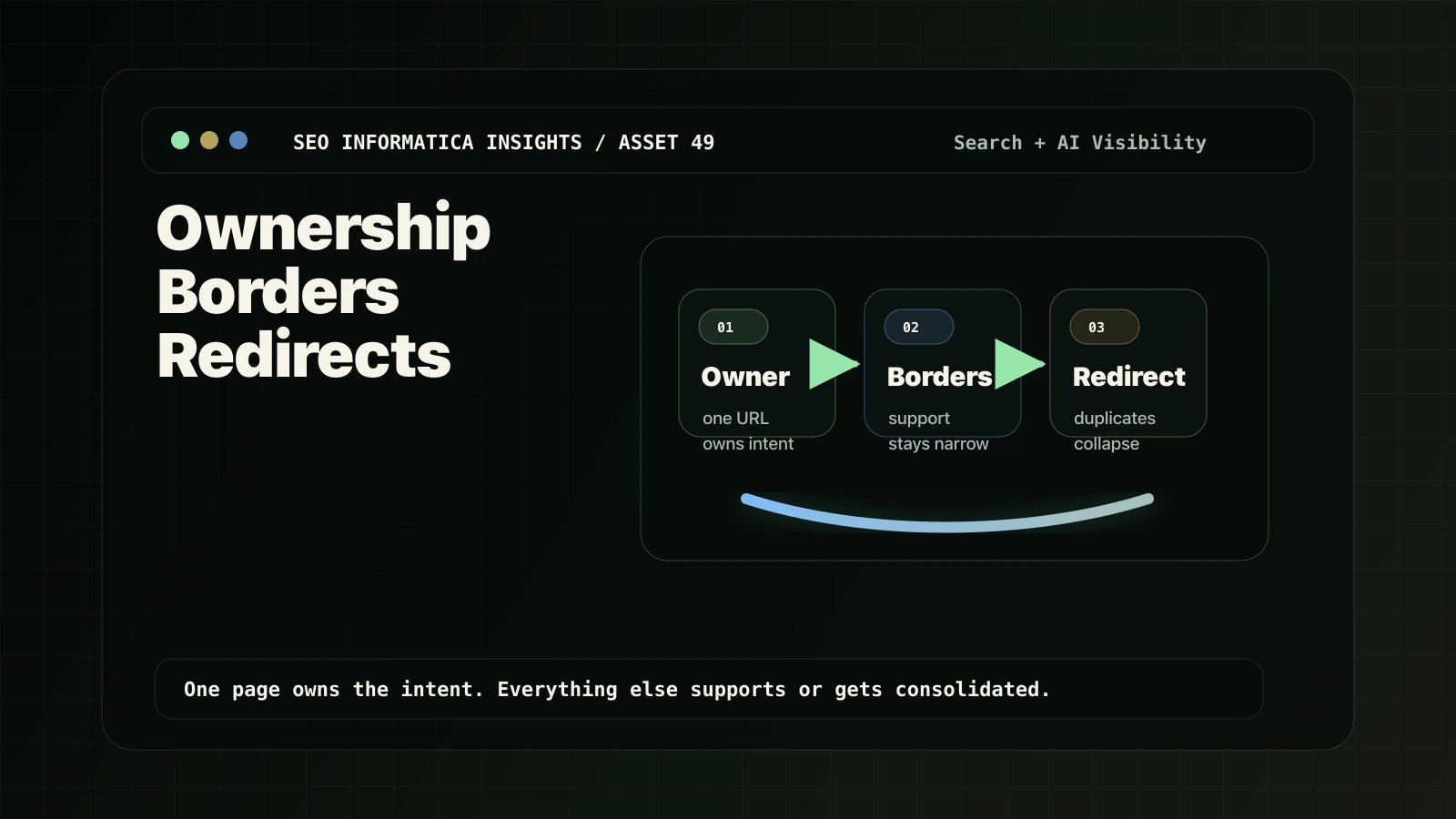
The fix is not "more AI content." The fix is page ownership, topic borders, and consolidation rules.
Use this SOP:
- Choose the owner page.
- Set borders for every support page.
- Merge, redirect, or canonicalize only after the page roles are clear.
For the commercial owner page, see Search + AI Visibility. If the overlap is already messy and you need implementation-ready direction, start with a Free Clarity Call.
Diagnosis summary
- Cannibalization is not two pages mentioning the same topic. It is two pages trying to own the same intent and same next step.
- AI visibility content creates overlap fast because AI SEO, AEO, GEO, AI Overviews, and ChatGPT Search often map back to the same buyer concern.
- The owner page must be chosen before support content is written. Otherwise every support article quietly turns into another service page.
- Borders are the missing control. A support page needs a clear intent nucleus, exclusions, CTA route, and bridge links.
- Redirects and canonicals are enforcement tools, not strategy. If page roles are unclear, technical consolidation will not fix the underlying content problem.
Cannibalization, in service-business terms
Cannibalization happens when two or more pages try to own the same buyer intent and the same next step.
It is not a problem if multiple pages mention AI visibility. A service page, a support article, and a technical cleanup guide can all mention the same topic if each page has a different job.
It becomes a problem when:
- multiple pages target the same "how do we show up in AI search?" question,
- several URLs use the same title promise,
- a support article reads like a second service page,
- all pages route to the same CTA from the same stage,
- internal links do not make one owner URL obvious.
For the service-page version of this diagnosis, use Fix Service Page/Blog Cannibalization and Blog vs Service Page Keyword Placement.
Why AI visibility content creates overlap faster
The same intent has many labels
One buyer searches "AI SEO."
Another searches "AEO."
Another says "GEO."
Many of them are asking the same thing: "Can you help my business appear when people use AI-influenced search?"
If each label becomes a separate generic page, the site gets wider but not clearer.
Fan-out query temptation is real
AI tools and SEO tools generate endless related questions. It is tempting to turn every fan-out variation into a page.
That is how sites create thin, overlapping URL sprawl.
Google’s generative AI guidance says optimizing for generative AI search is still SEO, and it warns against overdoing separate pages for query variations just to manipulate rankings or AI responses. Google’s spam policies also call out scaled pages created mainly to manipulate rankings instead of helping users.
The practical translation: do not use "AI visibility" as permission to publish a hundred weak variants.
Generic AI visibility pages look interchangeable
If every page says:
- create helpful content,
- add schema,
- answer questions,
- build authority,
- improve structure,
- book a call,
then none of them owns a distinct job.
The site needs fewer overview pages and more defined page roles.
Control 1: Ownership
Before publishing anything new, decide which URL owns the intent.
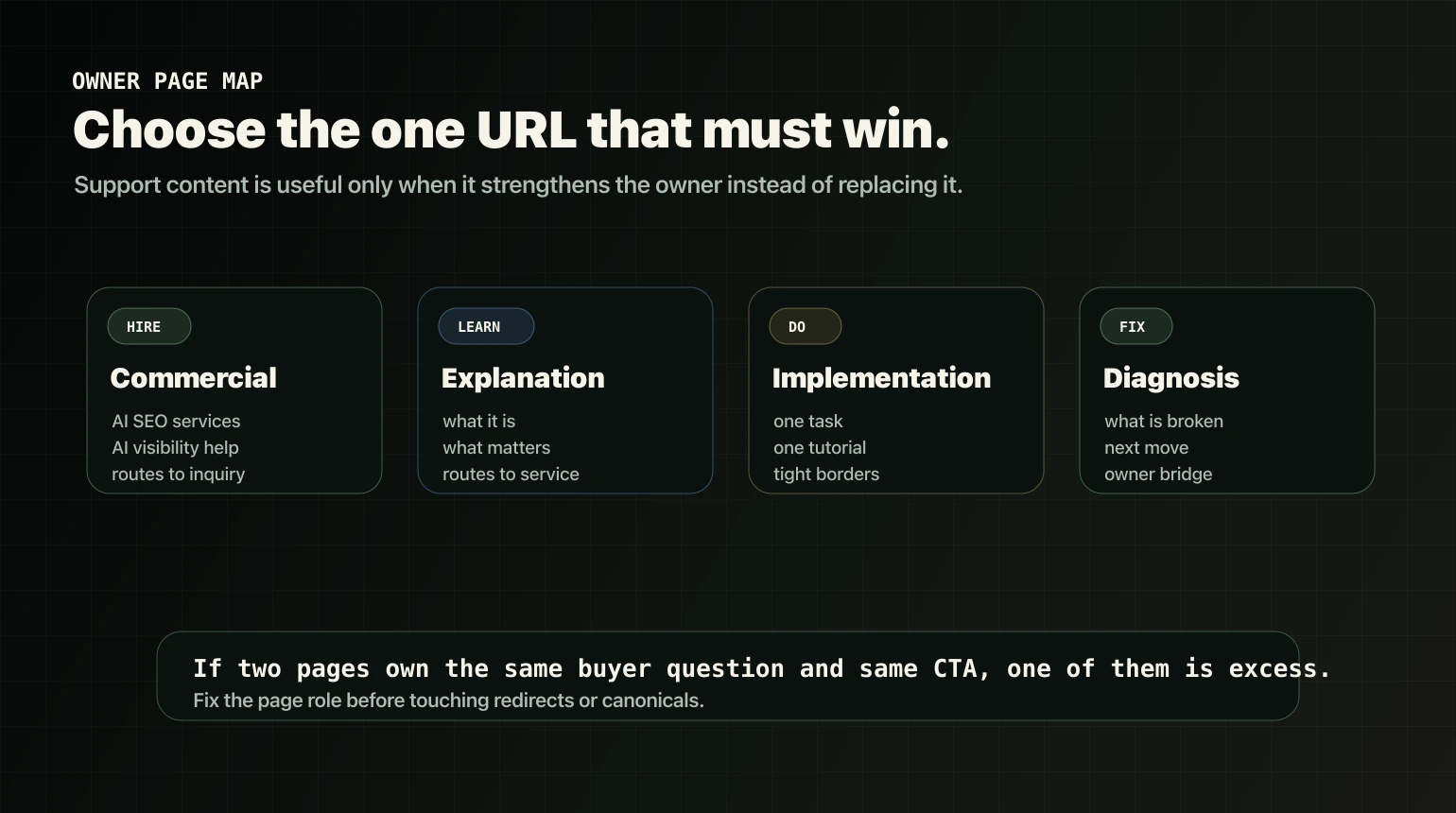
For a service business, there are four useful owner types.
Commercial owner
This is the page that should win hire intent.
Examples:
- AI SEO services
- AEO agency
- AI visibility consultant
- help us show up in AI answers
For SEO Informatica, the commercial owner is Search + AI Visibility.
Explanation owner
This page explains the concept for buyers who are not ready to hire yet.
It should answer:
- what AI visibility means,
- what actually matters,
- what does not matter,
- how the work connects to normal SEO.
For a live example, see AI Visibility for Service Businesses.
Implementation owner
This page owns one specific task.
Examples:
- making crawler access readable,
- measuring AI referral traffic,
- writing answer-ready sections,
- improving proof blocks.
The border matters here. An implementation page should not become another "what is AI visibility?" overview.
Diagnosis owner
This page helps the buyer decide what is broken.
It should separate technical eligibility, content clarity, cite-worthy sections, and conversion routing. If it turns into a service page, it loses the diagnostic job.
Control 2: Borders
A border is a rule that prevents a page from stealing another page’s job.
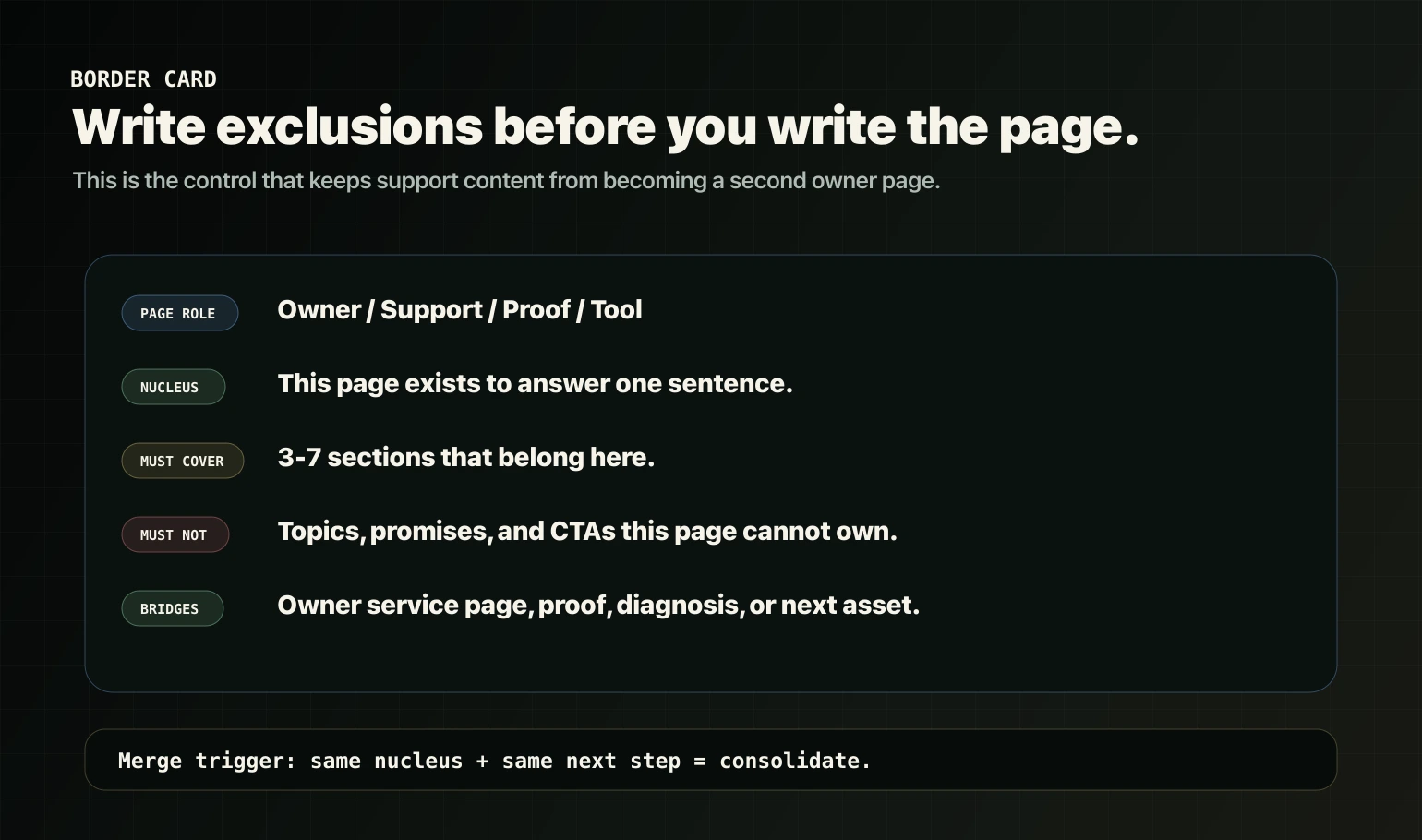
Every new AI visibility page needs a Border Card before drafting starts.
Border Card template
Page: [URL or planned slug]
Role: Owner / Support / Proof / Tool
Stage: TOFU / MOFU / BOFU
Intent nucleus: This page exists to answer: [one sentence].
Must cover:
- [3 to 7 sections that belong on this page]
Must not cover:
- This page must not try to own: [owner intent].
- This page must not duplicate: [owner page].
- This page must not push: [wrong CTA stage].
CTA route:
- Primary CTA goes to: [owner service page or Free Clarity Call].
- Secondary CTA goes to: [diagnosis, technical SEO, or support asset].
Internal links out:
- Link to the owner service page using descriptive anchor text.
- Link to the next logical support asset only if it is live and useful.
Merge trigger:
- If another page is published with the same nucleus and same next step, merge into the owner and 301 redirect the duplicate.
Control 3: Redirects and canonicals
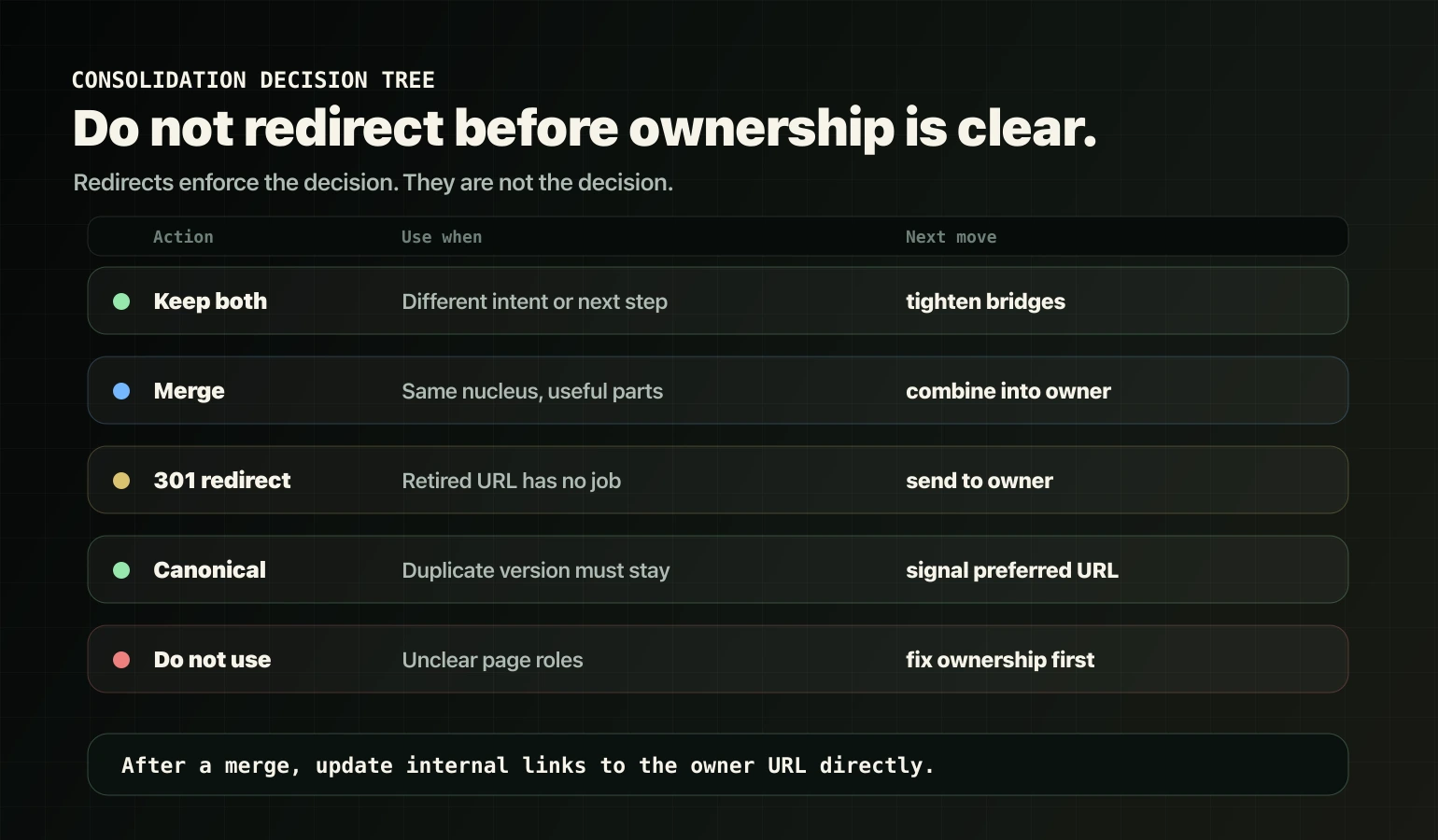
Redirects are not strategy. Redirects enforce a strategy after the ownership decision is clear.
Use this decision logic.
Keep both pages when
Keep both pages when the intent is different.
Examples:
- learn vs hire,
- compare vs buy,
- track vs crawl,
- diagnose vs implement.
Both pages still need clear bridge links so the reader understands the route.
Merge when
Merge when two pages answer the same nucleus and one of them does not deserve its own search destination.
Do this in order:
- Choose the owner page.
- Move the useful sections into the owner.
- Remove duplicated framing.
- Update internal links.
- Redirect the retired URL.
301 redirect when
Use a 301 redirect when the retired page is permanently replaced by a better destination.
Google’s redirects documentation treats permanent redirects as a canonical signal, and 301/308 status codes indicate a page has permanently moved to a new location.
Canonicalize when
Use a canonical when duplicate or very similar URL versions must remain accessible, but one URL should be treated as preferred.
Google’s canonicalization documentation describes redirects, rel=canonical, and sitemap inclusion as canonicalization signals with different strengths.
Important: a canonical tag is not a magic bandage for unclear page roles. If two genuinely different pages are both trying to own the same intent, fix the ownership problem first.
For technical cleanup at scale, use Technical SEO.
Borders for AI visibility content
Use these examples as working rules.
AI Overviews content
Do not let every AI Overview page become the same optimization guide.
Useful borders:
- A myths page owns what not to do.
- A "what matters" page owns eligibility, clarity, and structure.
- A service page owns commercial AI visibility help.
The bridge should move from education to the commercial owner, not sideways into more overlapping posts.
ChatGPT Search content
Readiness and tracking are different jobs.
Useful borders:
- Readiness owns crawl access, bot access, landing routes, and site accessibility.
- Tracking owns GA4, referral identification, reporting, and outcome measurement.
If a tracking article turns into a crawler setup guide, it is crossing its border.
Answer-ready writing content
Answer blocks should own section structure: direct answer, boundaries, proof, and path.
They should not become a general AI Overviews optimization guide.
Proof content
Proof blocks should own what to show, where to place it, and how to reduce doubt.
They should not become internal linking strategy or redirect strategy.
Routing content
Routing content should own internal link logic: blog to service page to proof to inquiry.
It should not become a merge, redirect, or canonical guide.
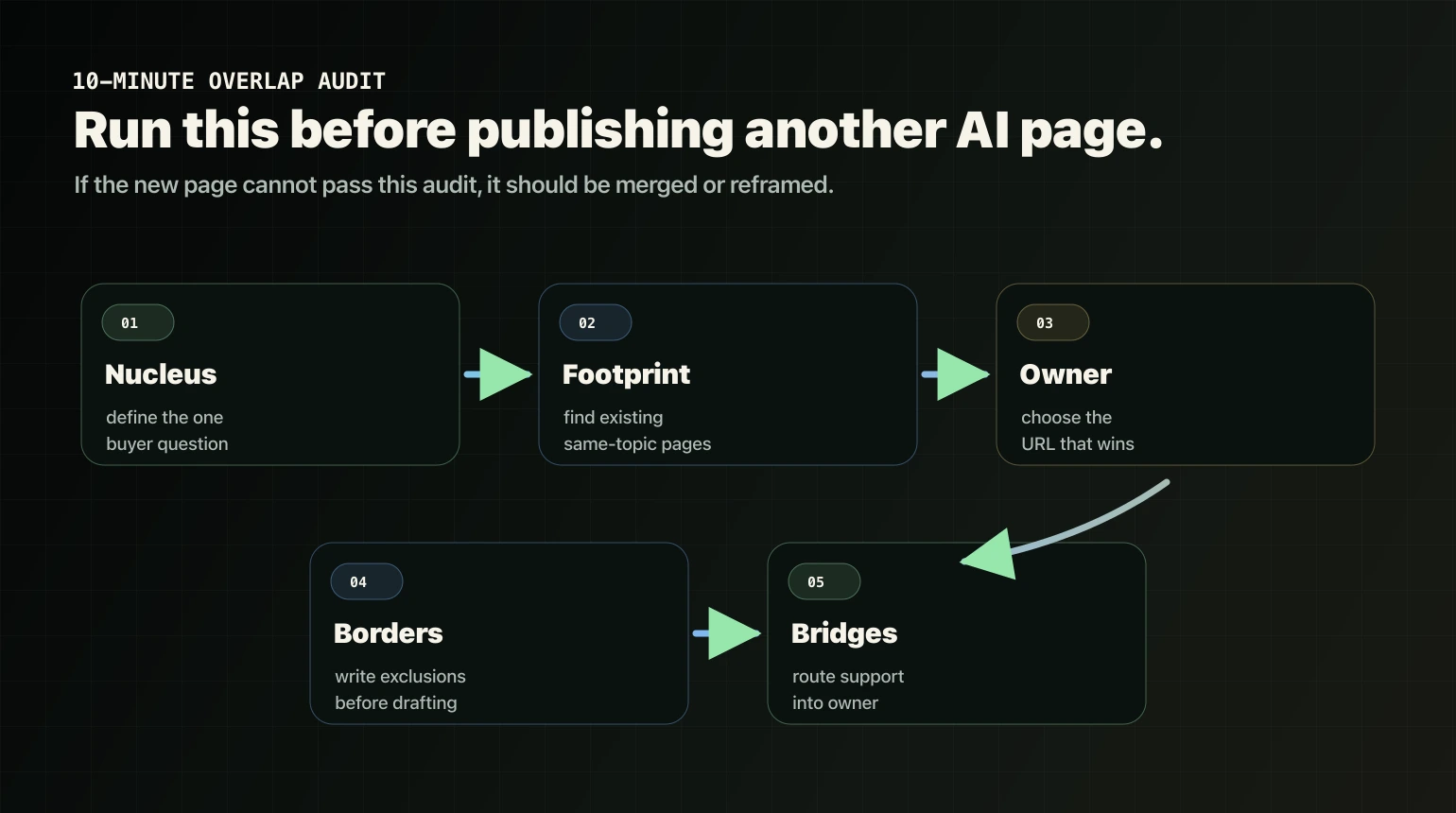
The 10-minute AI visibility overlap audit
Run this before every new AI visibility asset.
Step 1: Define the intent nucleus
Write one sentence:
This page exists to answer: [specific buyer question].
If you cannot define it, the page is not ready.
Step 2: Check the existing footprint
Search your site for pages that already cover:
- the same topic,
- the same title angle,
- the same CTA stage,
- the same service promise,
- the same next step.
Step 3: Choose the owner page
Use page-role logic:
- hire intent goes to the service page,
- learn or compare intent goes to an explanation page,
- measurement goes to a report or tool page,
- technical implementation goes to a technical support page.
Step 4: Write exclusions
Before drafting, decide what the page must not cover.
This is not optional. Without exclusions, the draft will expand until it overlaps something else.
Step 5: Define bridge links
Every support page should route to the owner service page or the next logical support asset.
Do not link to draft-only URLs. Do not make users hit redirects if the owner URL is already known. Google’s link guidance is blunt: use crawlable links with meaningful anchor text.
Redirect and consolidation checklist
When you identify overlap, use this order:
- Decide ownership. Which page should own the intent?
- Strengthen the owner page first. Add clarity, sections, proof, and a next step.
- Reframe the support page. Change the angle, title, opening, and CTA so it supports instead of competes.
- Merge if needed. Bring useful sections into the owner page.
- 301 redirect the retired URL. Use this only when the retired page no longer needs to exist independently.
- Update internal links. Point links directly to the owner, not through the old redirected URL.
- Reinforce the owner. Add it to relevant hubs, navigation, or sitemap surfaces where appropriate.
If the overlap is service-page/blog specific, use Fix Service Page/Blog Cannibalization.
Two composite diagnosis examples
Example A: six AI SEO articles and nothing improved
What is happening:
- Every article answers "how do we show up in AI search?"
- Every article pushes the same CTA.
- No clear commercial owner exists, or the commercial owner is weak.
- Internal links treat every post like an equal destination.
Fix:
- choose one explanation owner,
- choose one commercial owner,
- merge redundant sections,
- redirect duplicates after the merge,
- route every remaining support asset to the commercial owner.
If the foundation is messy across the site, use Website Rebuild.
Example B: a blog ranks for AI SEO services, not the service page
What is happening:
- the blog reads like a service page,
- the service page is too thin to own hire intent,
- the CTA and promise are the same on both pages.
Fix:
- rebuild the service page so it deserves the hire intent,
- rewrite the blog around a different stage,
- add bridge links back to the service page,
- strengthen proof and fit sections.
Use the Service Page SEO Checklist before you create another article.
Do not do this
Avoid these patterns:
- publishing separate pages for every synonym with the same content and CTA,
- creating fan-out pages just because tools suggest them,
- turning every support post into a second service page,
- using canonicals as a bandage for unclear page roles,
- redirecting pages before deciding whether the second page still has a job,
- scaling AI content while core service pages remain thin.
For local or service-area businesses, the same principle applies to location/service sprawl. See Build Location Pages Without Doorway SEO.
The simple rule
One page owns the intent.
Other pages support it with borders and bridges.
Redirects enforce the decision after the merge decision is made.
If you want this mapped to your site with implementation-ready direction, explore Search + AI Visibility or start with a Free Clarity Call.
FAQ
What is cannibalization in AI visibility content?
Cannibalization happens when multiple pages try to own the same intent and the same next step. In AI visibility topics, it often shows up as several articles that all answer the same "how to show up in AI search" question and push the same CTA.
Do I need separate pages for AI SEO, AEO, and GEO?
Not unless each page has a clearly different job. If they share the same intent nucleus and CTA, consolidate the overlap. Use one owner page and keep additional pages as support assets with tight borders and clear internal routing.
When should I merge and 301 redirect pages?
Merge and 301 redirect when two pages serve the same intent and one page no longer deserves its own search destination. Merge useful sections into the chosen owner page first, then redirect the retired URL and update internal links.
Will a canonical tag fix cannibalization?
Canonicals help consolidate duplicate or very similar URL versions. They do not solve unclear page roles where two genuinely different pages are trying to own the same intent. Fix ownership and borders first, then use technical consolidation where appropriate.
What is the fastest way to prevent overlap when publishing new AI visibility content?
Create a Border Card before writing: define the page intent nucleus, what it must cover, what it must not cover, the CTA route, and the internal bridges to the owner page. If a new page answers the same nucleus, merge it instead of publishing another URL.