

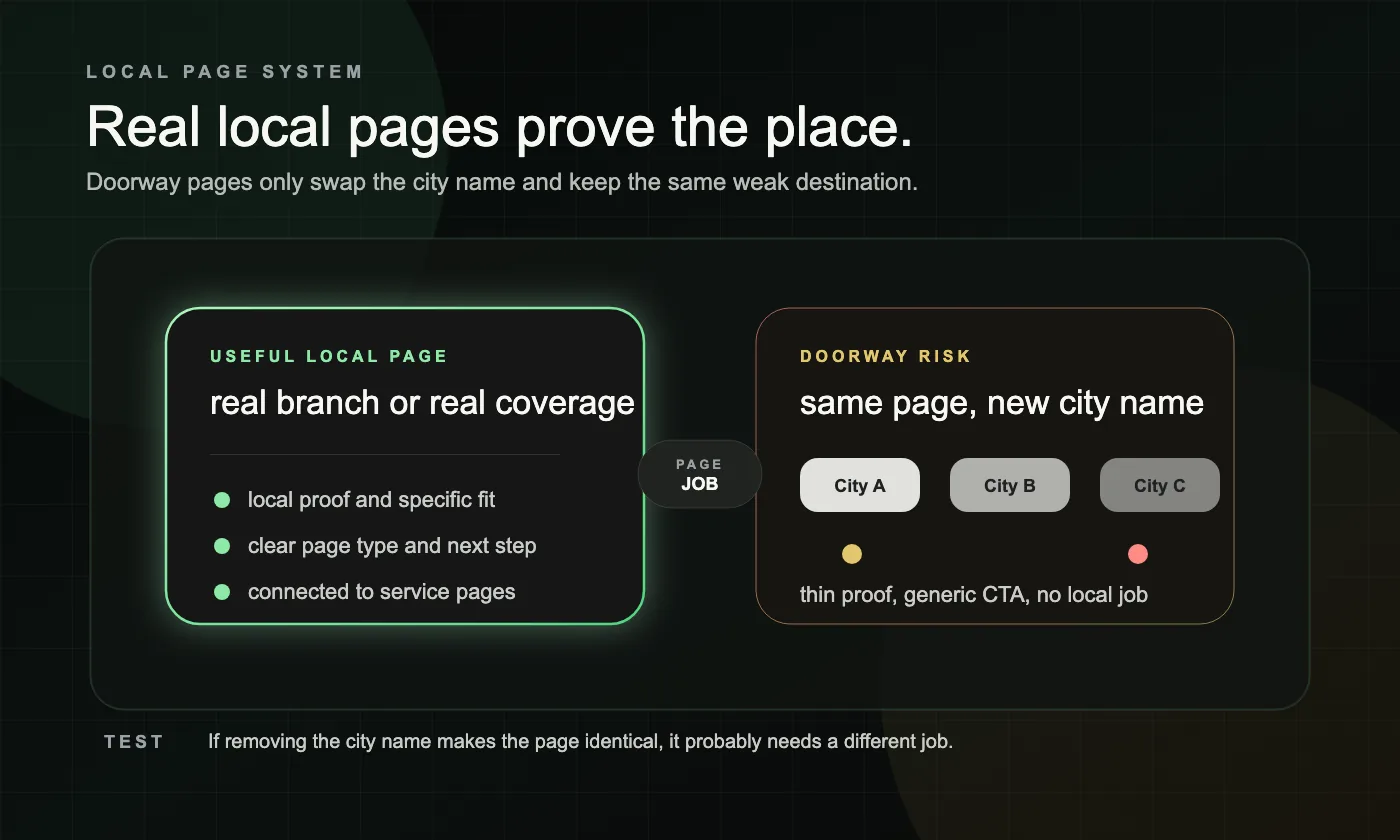
Location pages work when each page has a clear job for a clear place. They become doorway SEO when they exist mainly to rank for similar city queries and send everyone to the same generic destination.
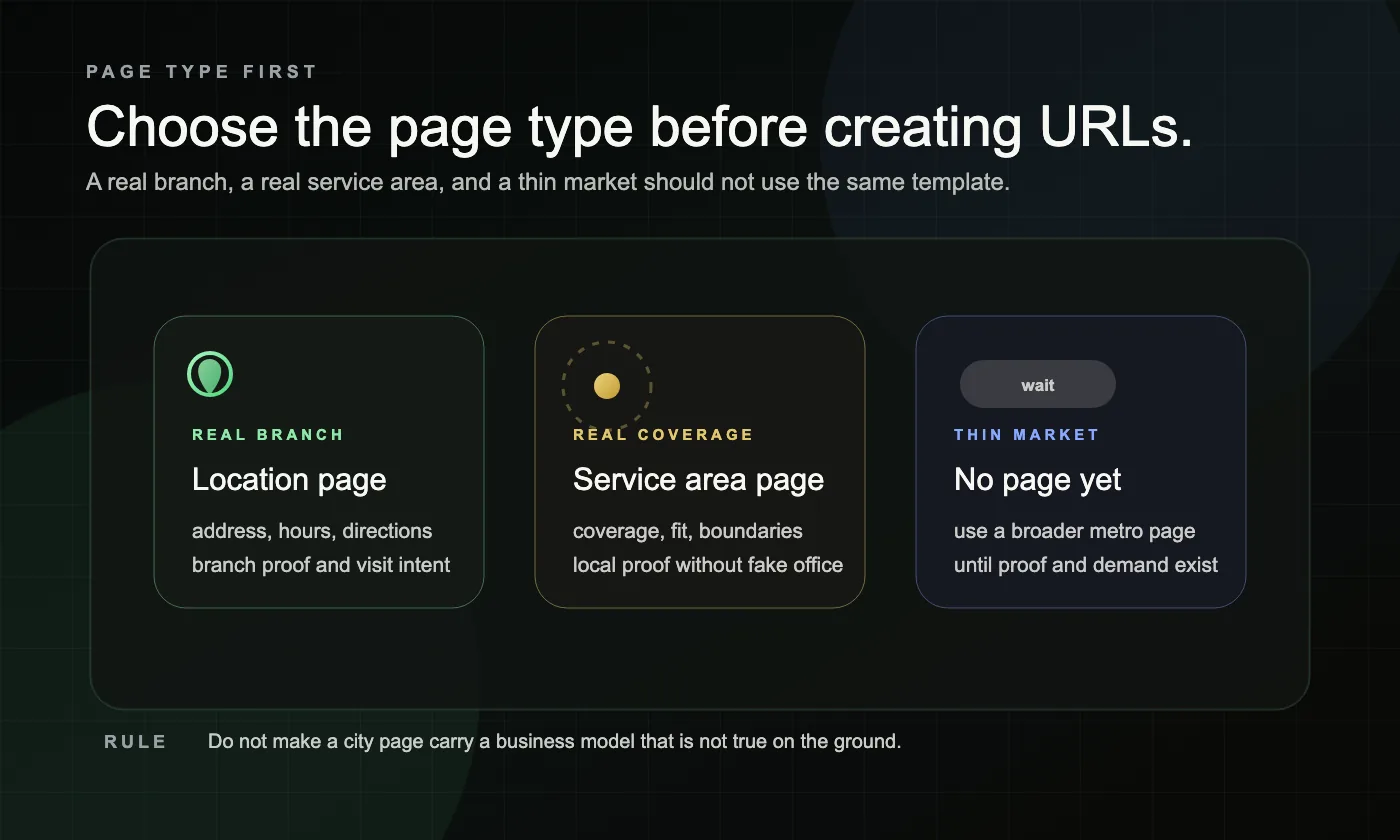
For service businesses, the first question is not how many city pages you can publish. The first question is what kind of page the searcher actually needs. If customers visit a real branch, build a location page. If you travel to them, build a service area page instead. Our Local SEO page shows how we connect local page systems, GBP alignment, and trust routing into one lead path.
Why do location pages become doorway pages?
Location pages become doorway pages when they are built for search coverage instead of user usefulness. Google treats doorway abuse as pages created to rank for specific, similar searches that lead people to intermediate pages that are less useful than the final destination. Google’s spam policies are the clean reference for this risk.
In practice, that usually looks like cloned city pages, fake office pages, or service-plus-city pages that all promise the same thing with only the place name swapped. The problem is not the existence of a city page. The problem is whether the page earns its place.
| Situation | Best page type | Why the page deserves to exist | What usually makes it risky |
|---|---|---|---|
| Customers can visit a real branch | Location page | It answers branch-specific questions like address, hours, directions, staff, and local proof | The same template gets reused with almost no branch-level detail |
| You do not have a storefront there, but you genuinely serve the area | Service area page | It explains coverage, fit, service boundaries, and local proof for that market | The page pretends the city has an office or uses a fake address |
| You have a branch and also travel to nearby areas | Both, but with separate jobs | One page supports visit intent and the other supports service-area intent | Walk-in and on-site intent get mixed on one vague page |
| The area is fringe, thin, or not well supported yet | No dedicated page yet | A broader metro page or stronger service page can handle it for now | The page exists only to capture one more keyword variation |
When should you build a location page instead of a service area page?
Build a location page when the visitor needs to know about a real place they can visit. Build a service area page when the visitor needs to know whether you serve their area and how the service works there.
Google says local visibility is shaped mainly by relevance, distance, and prominence, and service-area or hybrid businesses can define service areas in Business Profile instead of inventing storefronts that do not exist. See Google’s guidance on local ranking and service-area and hybrid businesses for that baseline.
Google’s business representation guidelines also say your address and/or service area should be accurate and precise. That is why a fake local office is not a shortcut. It is a signal problem. Google’s representation guidelines make that point directly.
What framework should you use before creating new local pages?
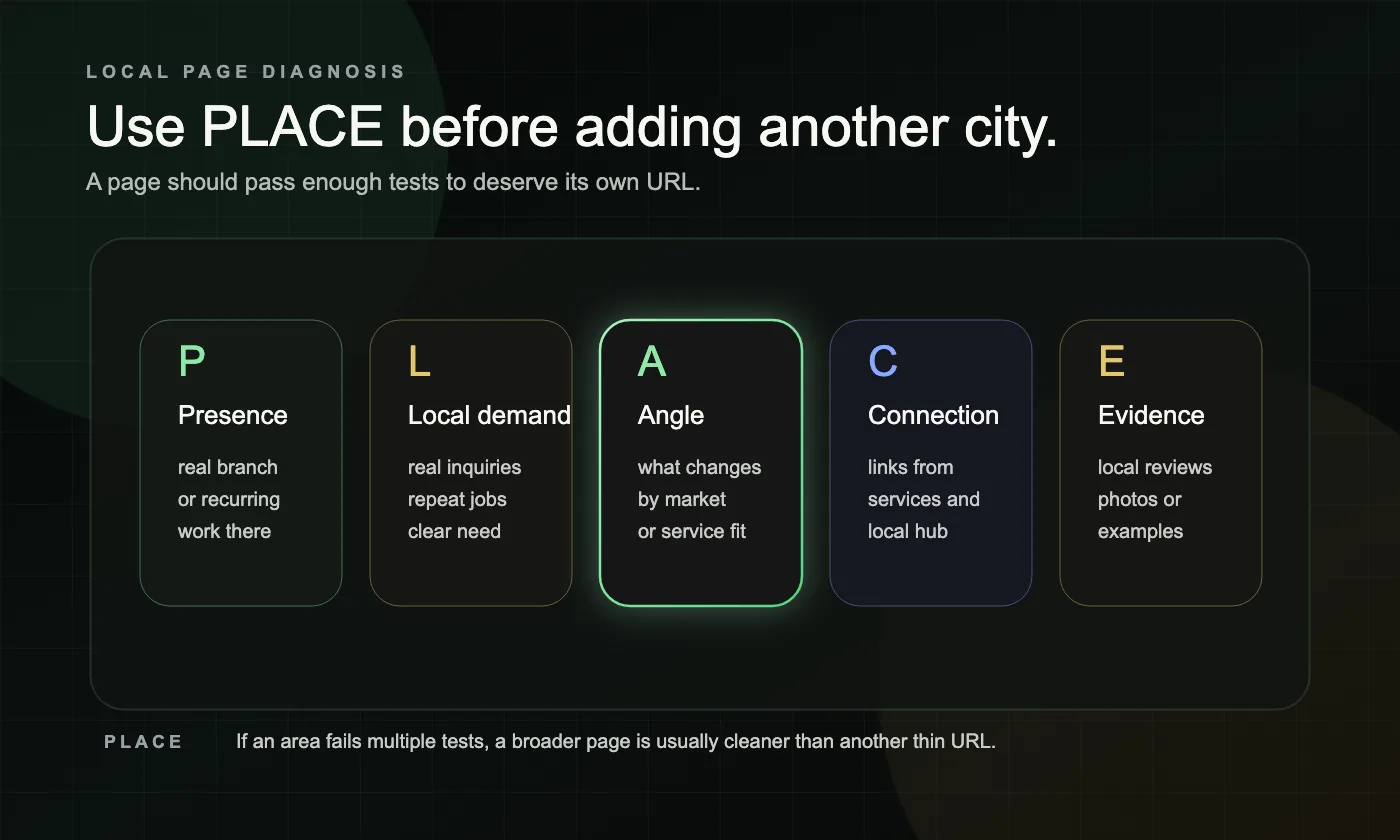
Use the PLACE framework: Presence, Local demand, Angle, Connection, and Evidence. If an area fails two or more of these tests, it usually does not deserve its own page yet.
Presence
Do you have a real branch there, or do you genuinely do recurring work there? If the page would feel misleading without Google, stop there.
Local demand
Is this a market that produces real inquiries, repeat jobs, or a clear service need? A nearby suburb that sounds attractive in a keyword list is not enough on its own.
Angle
What will make this page different from the next local page? Think service boundaries, common job types, local constraints, nearby neighborhoods, emergency response expectations, or fit guidance that actually changes by area.
Connection
Where does the page fit in the site? A strong local page should connect naturally to the relevant service page, local hub, or navigation path. It should not sit as an orphan page that only exists for search engines.
Evidence
What proof ties you to that place? Use local reviews, anonymized project context, photos, staff presence, map details for real branches, or area-specific FAQs that show the page belongs there.
Before you publish, run this quick checklist:
- one clear page type: location page, service area page, or no page yet
- one clear service-plus-place intent cluster
- one real proof source tied to the area
- one obvious next step
- one natural internal route from the main service page or local hub
- one clear reason the page helps a local visitor more than a broader page would
What should a strong local page include?
A strong local page should help a nearby buyer understand the service, the fit, the proof, and the next step without making them guess. It should not read like a city-swapped copy block.
For a true location page, that usually means visit information, branch-specific proof, and reasons to choose that branch. For a service area page, it usually means coverage clarity, how the service works in that area, local proof, and one clear CTA. In both cases, the page should answer the questions that matter in that place rather than trying to inflate page count.
A useful structure looks like this:
- a clear local service promise
- a short explanation of who the page is for
- branch or service-area details that are genuinely local
- proof from that area, such as reviews, photos, or a brief anonymized example
- FAQs based on local hesitation
- one clear next step
What does this look like in a real service business example?
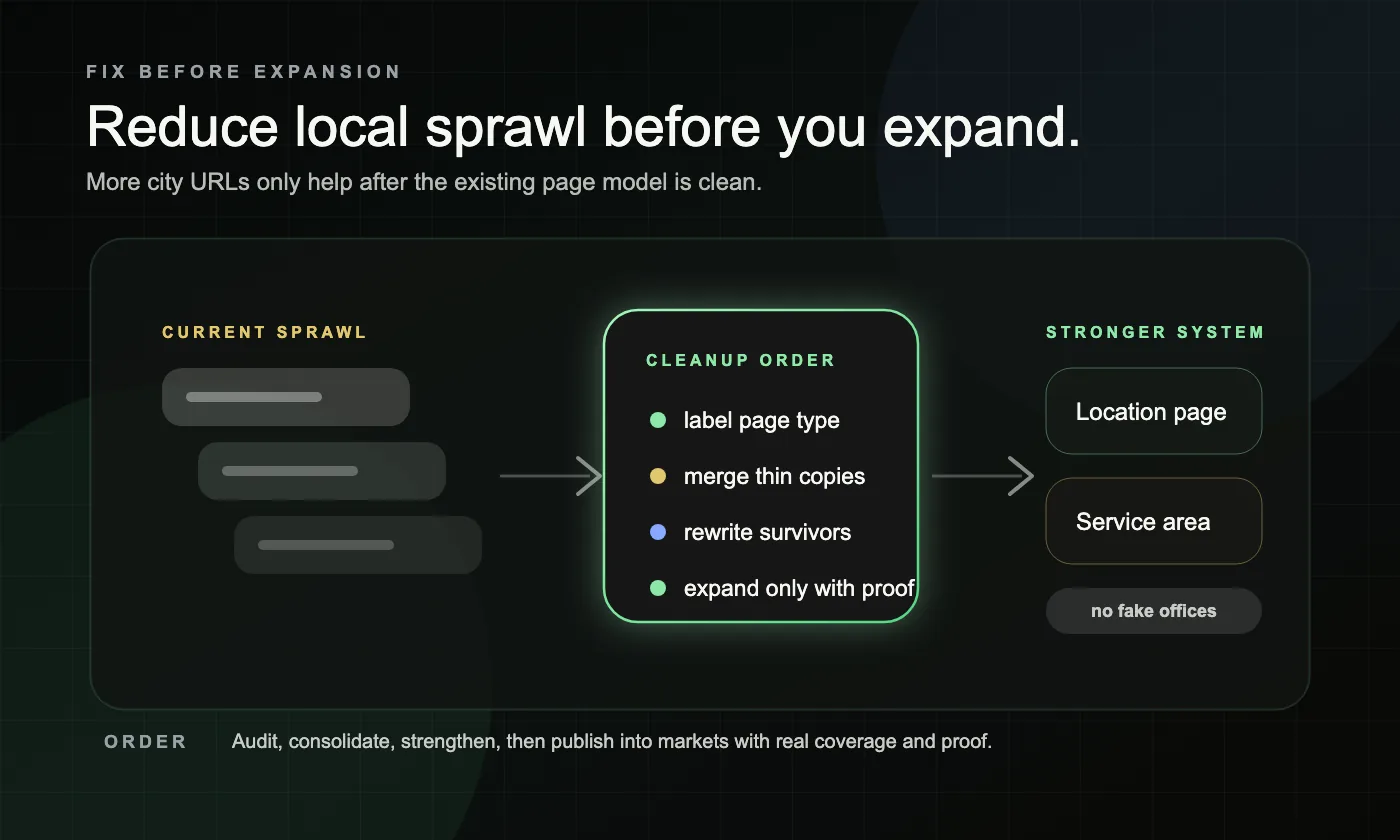
A real fix usually starts by reducing sprawl, not by publishing faster.
Composite example 1: A home service company created 24 city pages in one quarter. Most had the same intro, same service list, same CTA, and no local proof. A few picked up impressions, but none became reliable lead pages. The better move was to collapse the footprint into six priority service area pages, rewrite each one around real coverage and local questions, add area-specific reviews and photos, and route them naturally from the main service pages.
Composite example 2: A hybrid business had a real branch in one city and traveled to surrounding towns for installation and repair. One generic local page tried to do everything. The fix was to separate the jobs: one true location page for the branch people could visit, and separate service area pages for the surrounding markets where customers needed coverage clarity instead of storefront details.
In both cases, performance improved when the page matched the business model more honestly.
What should you fix first before publishing more city pages?
Fix the page model and the pages you already have before adding more. Expansion into the wrong template only multiplies the problem.
Use this order:
- Label every current local page as true location page, true service area page, or doorway risk.
- Merge, retire, or rewrite the thin pages that only swap city names.
- Strengthen the surviving template with local proof, local FAQs, and a clearer next step.
- Align internal links so the right service pages and local pages support each other.
- Expand only into markets where you have real coverage, real proof, and a clear reason for a dedicated page.
Our Local SEO page shows how we build that system without turning local coverage into page sprawl.
If thin local pages, overlap, or service-area confusion show up across the site, our Website Rebuild page is the better next read.
What mistakes turn local pages into doorway SEO?
Most doorway-style local pages fail in predictable ways. They either claim more presence than the business really has, or they try to solve local SEO with volume instead of clarity.
Common mistakes and red flags include:
- publishing one page for every city, neighborhood, and ZIP code before the core pages are strong
- using the same page copy and only swapping the place name
- presenting a service area like a storefront with a fake address or fake directions
- giving every local page the same generic CTA with no local proof nearby
- leaving local pages out of the normal site structure so they only exist in XML sitemaps or footers
- creating separate pages for areas with no real demand, no real proof, and no clear job
A simple test helps here: if someone from that place landed on the page and removed the city name, would anything meaningful still be different? If not, the page probably needs a different job or does not need to exist at all.