

Local SEO is not “make a page for every city.”
Local SEO is an architecture problem: deciding which pages should exist, what each page owns, and how those pages route a local buyer into the right service and the right next step.
If you want this designed properly for your business model, start with Local SEO. If your site already has overlap, duplicated pages, or unclear structure, fix the foundation first with Website Rebuild. If you want clarity on what to build and what to delete or merge, start with a Free Clarity Call.
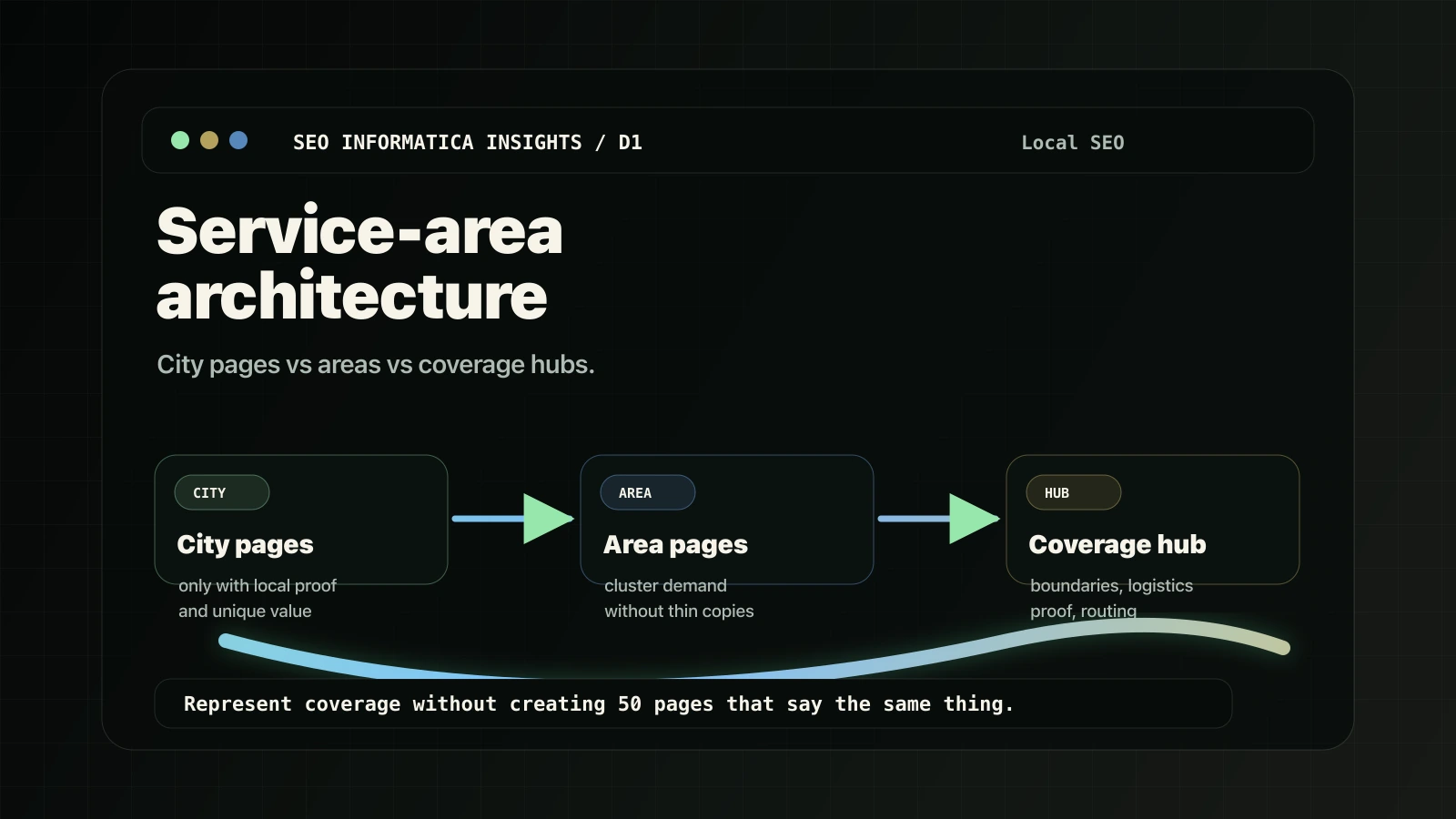
Diagnosis summary
- City pages can work, but only when they add real, local-specific value. Otherwise they create duplication and weak performance.
- Area pages are often the safer middle layer when you serve many places but cannot justify a page per city.
- Service-area pages help service-area businesses explain boundaries, routing, and trust signals without doorway-style duplication.
- The #1 local failure mode is mixing these page types without ownership rules. Then your pages compete with each other instead of supporting conversions.
Official references behind the guardrails: Google’s spam policies warn against doorway-style pages built for similar regional or city queries, and Google Business Profile documents how service-area businesses should represent areas served.
- Google Search Central spam policies: https://developers.google.com/search/docs/essentials/spam-policies
- Google Business Profile service-area guidance: https://support.google.com/business/answer/9157481
What “service-area architecture” means
Service-area architecture is how your site represents “where you serve” and “what you do” without creating 30+ near-identical pages.
A good architecture answers three questions clearly:
- What services do we sell? Service intent ownership.
- Where do we serve? Local intent coverage.
- Where should a buyer go next? Routing to conversion.
Most problems happen because sites create pages for “service + city” without deciding:
- which page is the main owner,
- what is unique on each local page,
- how local pages route to service pages and action.
City pages vs area pages vs service-area pages
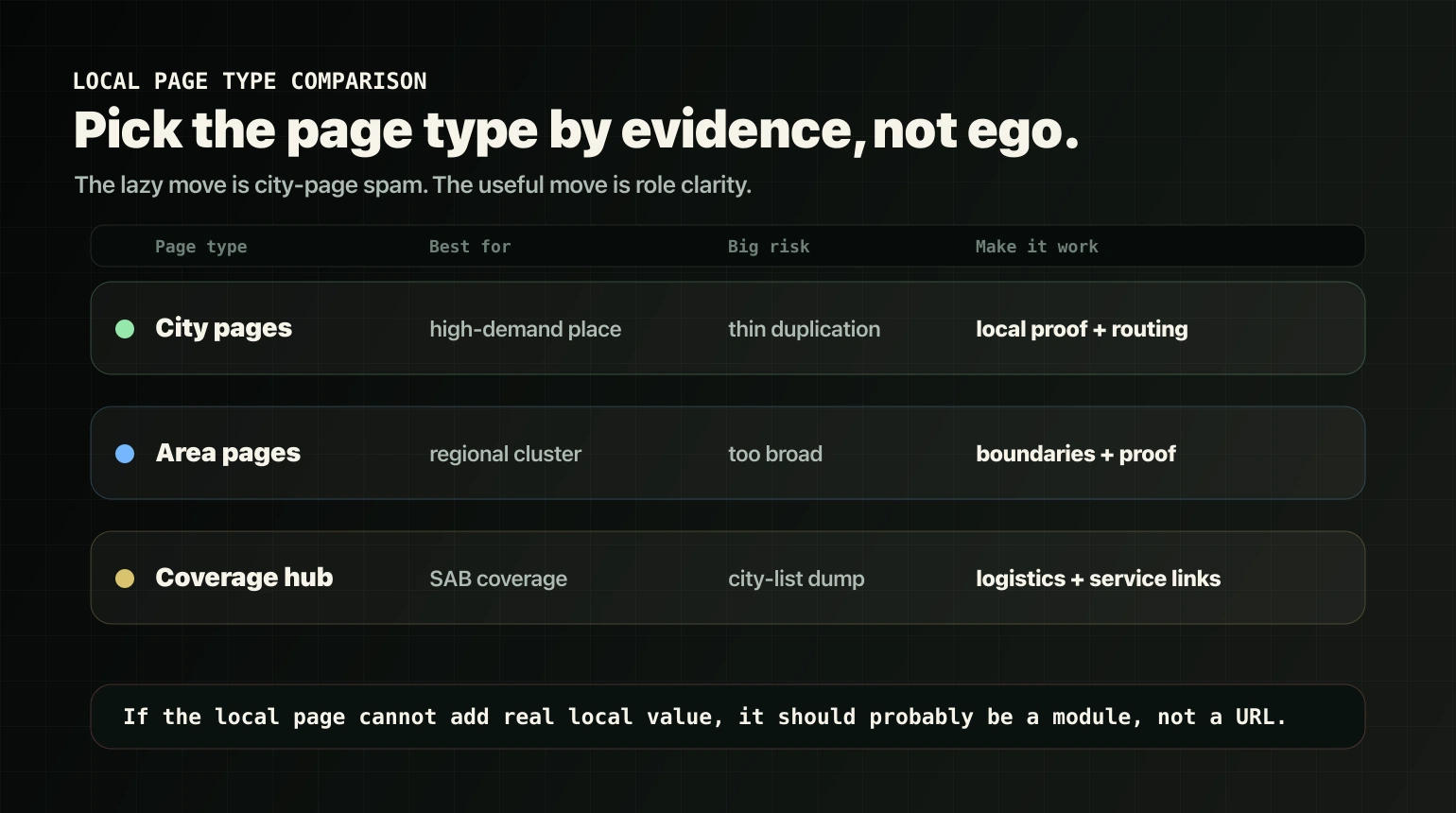
| Page type | Best for | Big risk | How to make it work |
|---|---|---|---|
| City pages | High-demand cities where you can add real local proof and value | Duplication or thin doorway-style pages | Unique local modules and clear routing to the owner service page |
| Area pages | Covering a cluster, region, county, or zone without a page per city | Too broad or vague to match intent | Define included cities, boundaries, proof, and links to top city pages if they exist |
| Service-area coverage page | Service-area businesses that travel to clients | Becoming a generic list of cities | Explain boundaries, logistics, local proof, and routes to service owner pages |
Start with page roles
Before local pages, decide what owns commercial intent.
- Service pages are usually your owner pages: the pages that should win “hire [service].”
- Local pages should own justified local variants: “[service] in [place].”
- Action pages capture conversion. For SEOI, that is usually Free Clarity Call.
If your service pages are unclear or overlapping, local pages will amplify the mess. That is why many local wins start with a foundation pass like Website Rebuild.
Choose your architecture based on your business model
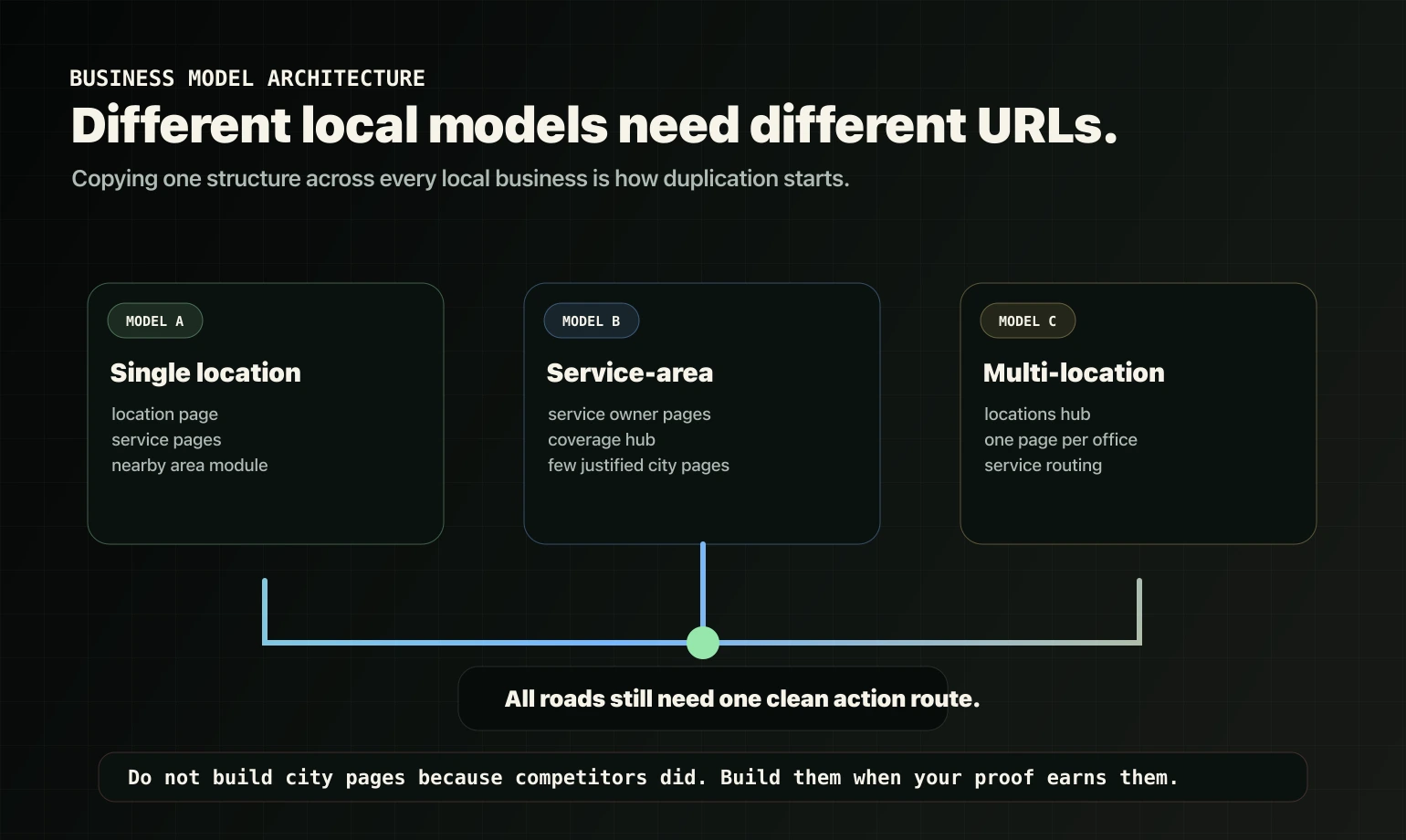
Model A: Single-location storefront
Default structure:
- One strong location page with address, hours, local proof, directions, and a “serves nearby areas” module.
- Service pages beside it, each owning its service intent.
- A service areas section on the location page, usually better than 30 thin city pages.
Only add city pages here if you have meaningful demand and unique local value.
Model B: Service-area business
This is where architecture matters most.
Default structure:
- Service pages own the main commercial intent.
- One Service Area / Coverage page explains where you serve and the boundaries.
- A limited set of city pages exist only for priority places where you can add unique proof or value.
Why this works: you represent coverage without needing 50 pages that say the same thing.
Model C: Multi-location business
Default structure:
- A locations hub listing each location.
- One location page per office with unique proof, team/process notes, and local details.
- Shared service pages can work, but each location page should route to the relevant services and clarify what is available there.
Avoid copying the same service page for each location unless the location truly changes the offer and proof.
City pages: when they work
City pages can be powerful when they are real local landing pages, not placeholders.
City pages usually make sense when:
- the city has real search demand for your service,
- you actively serve that city,
- you can include local proof: projects, reviews, partners, team coverage, photos,
- you can explain local constraints: response time, permits, building types, service windows.
City pages usually create problems when:
- they are the service page with the city name swapped,
- they exist only to “rank in more places,”
- you publish dozens at once with no unique proof,
- they compete with your main service page.
City page uniqueness checklist
If you cannot add at least 2-3 of these, do not build the city page yet.
- Local proof module: reviews mentioning the city, project snapshots, local client logos.
- Coverage boundaries: where you do and do not go, and why.
- Response-time/logistics note: typical travel time, visit windows, availability.
- Local constraints: property types, compliance needs, permits, building access.
- Local FAQs: questions that only come up in that area.
- Local imagery: real photos, team presence, or on-site work where appropriate.
Routing rule: every city page must route to the correct service owner page and the primary action, such as Free Clarity Call.
Area pages: the underrated middle layer
Area pages work well when you serve many places but do not have enough unique proof for a page per city.
Examples of area concepts:
- a region,
- a county or district,
- a service zone,
- a cluster of nearby neighborhoods.
What makes an area page valuable:
- clear boundaries,
- service model logistics,
- local proof that applies to the cluster,
- links to any priority city pages and to service owner pages.
Area pages reduce duplication risk while still matching “near me” and “in [region]” style intent.
Service-area coverage pages
A service-area page is not a “we serve these 200 places” list.
A good service-area coverage page answers:
- Where do you serve? Clear boundaries.
- How does service work across the area? Travel time, scheduling, service windows.
- What proof supports coverage? Reviews and projects across the area.
- What is the next step? Route to services and action.
Recommended structure:
- Coverage summary.
- How service works across the region.
- Local proof stack.
- Links to priority service owner pages.
- CTA to action, such as Free Clarity Call.
GBP landing page routing
This is a common mistake: the GBP points to a random page, or a page that does not match local intent.
Use this rule of thumb:
- If you are single-location, GBP often points to the location page.
- If you are a service-area business, GBP often points to the most relevant service owner page or a strong service-area page, depending on how you sell.
- If you are multi-location, each location’s GBP should point to its corresponding location page.
Most important: whichever page you choose must make the buyer feel, “Yes, they serve my area, and I know what to do next.”
If you want this mapped properly, explore Local SEO or start with a Free Clarity Call.
How to prevent local cannibalization
Local cannibalization happens when your service page and your city page both try to own the same intent with similar copy.
Prevention rules:
- Service pages own core commercial intent: “hire [service].”
- City/area pages own local variants: “[service] in [place].”
- City/area pages must include local-specific modules and must link to the service owner page.
- Use internal anchors that match the role:
- City page -> service page anchor: “[service] services” or “[service] support.”
- Service page -> city page anchor: “Serving [city/area].”
If your site already has dozens of overlapping pages, start with structure cleanup first: Website Rebuild.
What to do if you already have 20+ thin city pages
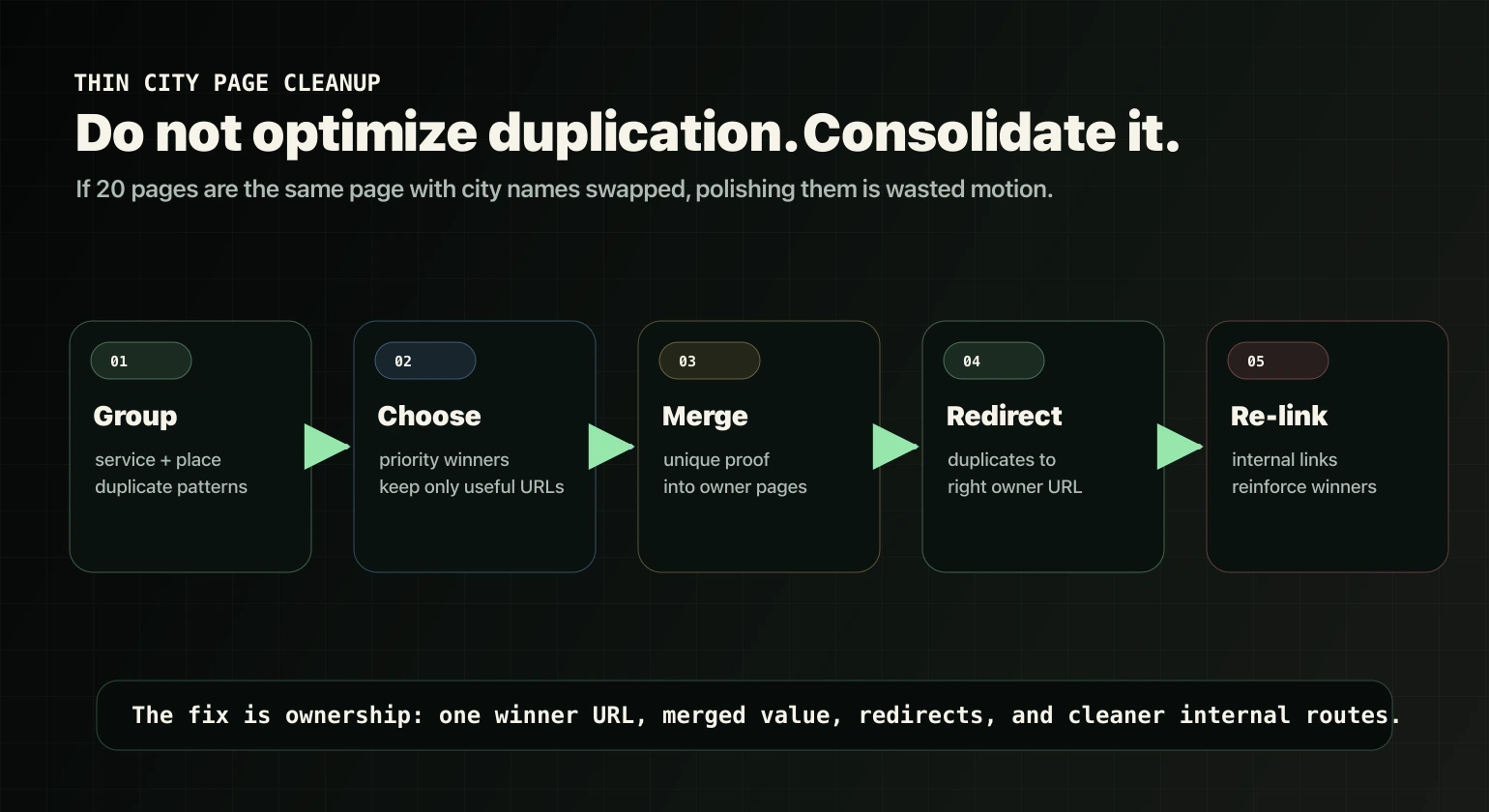
Do not “optimize all of them.” Consolidate and re-assign roles.
Step 1: Group pages by service + place
Find pages that are basically duplicates with swapped city names.
Step 2: Choose winners
- Keep a small set of priority city pages where you can add real local proof.
- Convert the rest into an area page strategy or a coverage hub.
Step 3: Merge + redirect + re-link
- Merge any valuable unique content into the remaining pages.
- 301 redirect duplicates to the correct owner page.
- Update internal links to reinforce the new structure.
If you want this done as a structured engagement, it usually sits under either Local SEO for local architecture or Website Rebuild for site-wide ownership cleanup.
Service-area architecture QA checklist
- Ownership defined? Service pages own commercial intent; local pages own local variants.
- City pages only where justified? Demand, unique value, and proof.
- Area/coverage layer exists? So you are not forced into 50 city pages.
- Each local page has 2-3 unique local modules?
- Internal routes exist? Local -> service owner -> action.
- GBP landing page matches the model? Single, service-area, or multi-location.
- No combo page explosion? Service + city + industry pages multiplying.
Want us to design your service-area architecture?
If your structure is already messy, we will tell you if you need a rebuild first. Otherwise, start with a Free Clarity Call.
Frequently Asked Questions
Should we build a city page for every place we serve?
Not by default. City pages should exist only where you can add real local value: proof, constraints, boundaries, and logistics. If city pages are thin or duplicated, an area or coverage architecture is often safer and converts better.
What is the difference between an area page and a service-area page?
An area page usually represents a region or zone cluster. A service-area page is a coverage hub that explains boundaries and logistics for a service-area business. Many sites use both: coverage hub plus a few priority area or city pages.
Will a service page rank for “service in city” queries?
Sometimes, yes. If city pages would be thin, it can be better to keep ownership on the service page and add local modules. If local demand is strong and you can add unique value, a city page can be the better owner.
How many city pages is too many?
There is no universal number. The better question is whether each city page can be meaningfully unique with local proof or value and a clear route to conversion. If not, consolidate into area pages and a coverage hub.
What if we already have duplicated city pages?
Consolidate: choose priority winners, merge valuable content, redirect duplicates, and update internal links so one structure is reinforced. If the duplication is site-wide, start with Website Rebuild.
Next step: If you want this mapped to your business model and market, explore Local SEO or start with a Free Clarity Call.