
If an important page is not indexed, it cannot compete. It does not matter how polished the copy is, how expensive the design was, or how strong the offer looks internally.
For service businesses, indexation failures usually hit the pages that matter most: service pages, location pages, comparison pages, case-study pages, or newly rebuilt revenue pages.
The bad fix is to smash "request indexing" and hope. That is not a strategy. It is button-clicking.
The useful fix is diagnosis first: find whether the page is blocked, redirected, duplicated, orphaned, weak, or structurally unclear. If the blocker is technical, Technical SEO is the right lane. If the blocker is page overlap and ownership confusion, the fix usually moves into foundation work.
Diagnosis summary
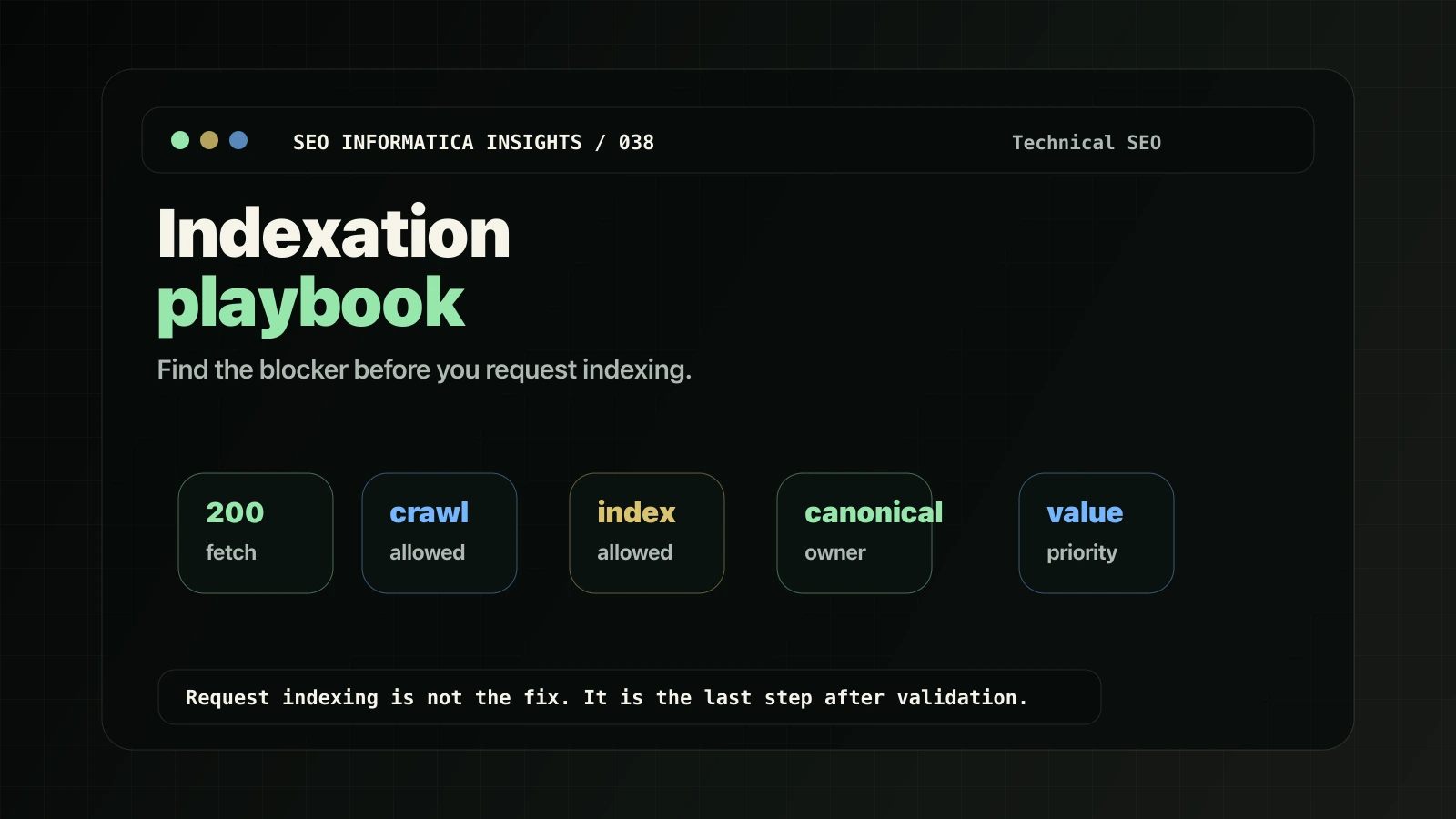
- Indexing is not random. A page is usually blocked, redirected, canonicalized away, duplicated, low value, or not important enough in the site structure.
- Search Console gives you the starting reason. The URL Inspection tool and Page indexing report are the core diagnostic surfaces.
- Request indexing is not a fix. It is only useful after the blocker has been removed.
- Service sites often have structural blockers. Similar service, city, and industry pages can make Google choose one URL and ignore the rest.
What you need
- Google Search Console access for the property.
- The exact URL you want indexed.
- A browser that can view page source.
- CMS or developer access if you need to remove blockers.
Google's URL Inspection tool can show indexed status, page indexing details, crawl information, user-declared canonical, and Google-selected canonical. Google's Page indexing report groups non-indexed URLs by reason, which is useful when the issue affects more than one page.
How to diagnose why a page is not indexed
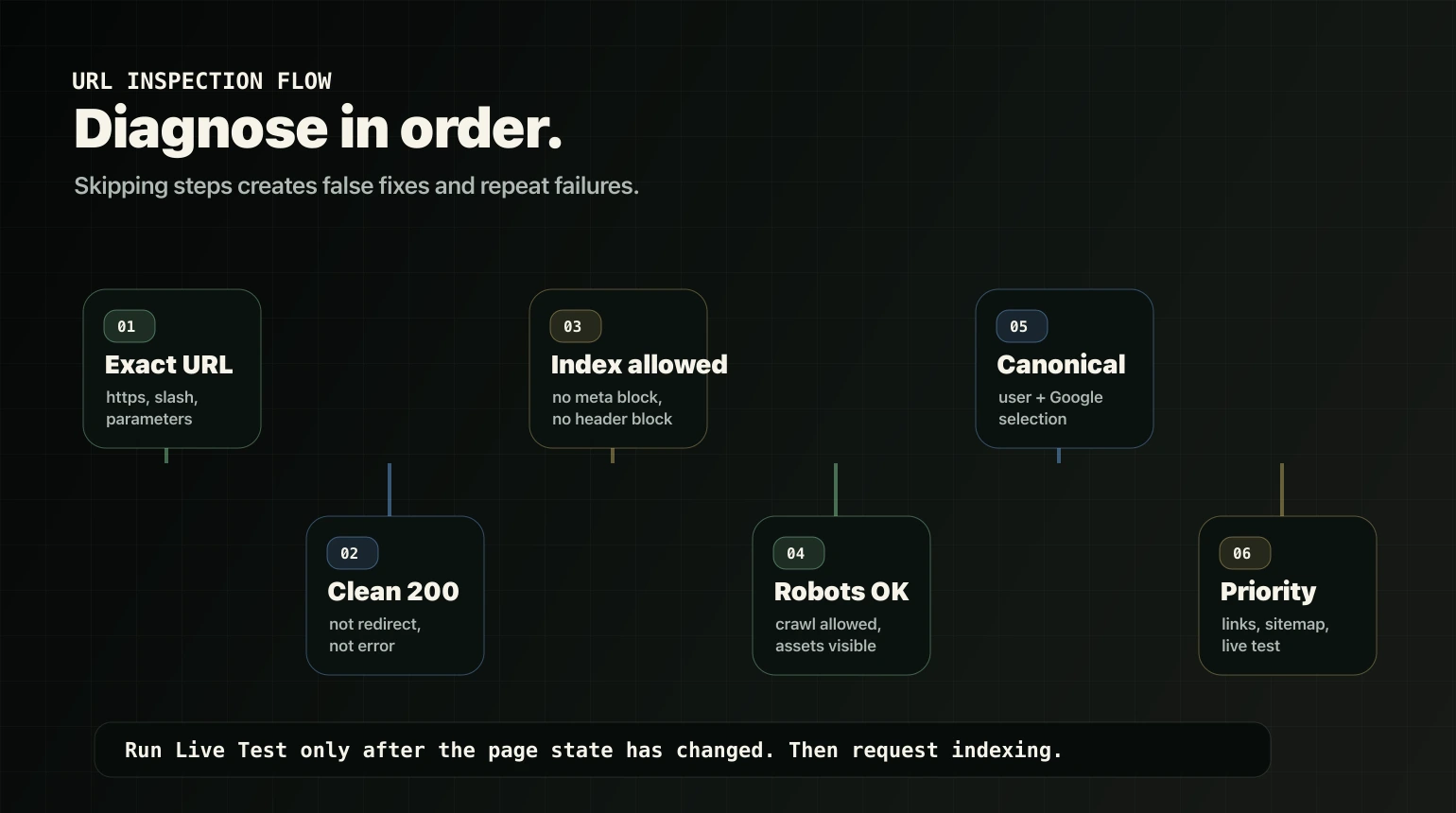
Follow the sequence. Do not skip to validation until you know what failed.
Step 1: Confirm you are checking the correct URL
This sounds too basic. It is still a common source of trash diagnosis.
Check:
httpsvshttpwwwvs non-www- trailing slash vs no trailing slash
- parameters, filters, and UTM variants
- redirected URLs vs final destination URLs
Use the exact intended URL in Search Console URL Inspection.
Step 2: Confirm the page returns a clean 200
If the page redirects, errors, requires login, or looks like an empty page, indexing will not behave the way you want.
Check whether the URL:
- loads normally,
- stays on the same intended URL,
- returns a stable
200 OK, - avoids login walls, forbidden messages, or server errors.
If the intended URL redirects, inspect the final destination too. Google evaluates the final URL differently from the redirecting URL.
Step 3: Check for noindex
noindex means the page is explicitly telling search engines not to index it.
Check:
- page source for a robots meta tag such as
<meta name="robots" content="noindex">, - HTTP headers for an
X-Robots-Tag: noindexrule, - SEO plugin settings,
- WordPress visibility settings,
- staging-migration settings that may still discourage search engines.
Google's robots meta and X-Robots-Tag documentation confirms that both can control indexing when Google can crawl the page.
Source: Google robots meta tag and X-Robots-Tag specifications
Step 4: Check robots.txt crawl blocking
Robots.txt controls crawling, not clean removal from the index. If you block crawling, Google may not be able to see your page content or its indexing directives.
Check whether robots.txt blocks:
- the exact URL,
- a parent folder,
- parameter patterns,
- CSS or JavaScript needed to render the page.
Google's robots.txt guidance is blunt: disallowed crawling can stop Google from indexing the content of a page, although the URL itself might still appear without a useful snippet.
Source: Google robots.txt introduction and guide
Step 5: Check canonicals
Canonicals are where many service sites accidentally tell Google, "Index a different page."
Check:
- the user-declared canonical in the page source,
- the Google-selected canonical in URL Inspection,
- whether internal links point to the canonical owner URL,
- whether the sitemap lists the canonical version.
If Google chooses a different canonical, your declared canonical is only a signal. It is not a command.
Source: Google canonicalization guidance
Step 6: Check internal links
If a revenue page is orphaned, buried, or only linked from weak places, you are telling search systems and users that it is not important.
Check:
- Does navigation or a relevant hub link to it?
- Do related service pages link to it contextually?
- Do support articles route into it?
- Are internal links split across duplicate versions?
The fix is not "add random internal links." The fix is to reinforce the correct owner URL from relevant pages.
Step 7: Check the sitemap
Sitemaps help discovery. They do not rescue weak, duplicate, blocked, or non-canonical pages.
Check:
- whether the URL appears in the XML sitemap,
- whether the sitemap contains the canonical URL,
- whether the sitemap includes redirects, noindex pages, or junk taxonomy URLs,
- whether Search Console reports a referring sitemap for the inspected URL.
If the sitemap is full of trash, clean the inputs. Do not submit noise and expect Google to treat your priority pages as priority.
Step 8: Use URL Inspection and Live Test
In Search Console:
- Open URL Inspection.
- Paste the exact URL.
- Read the Page indexing result and reason.
- Review crawl allowed, page fetch, indexing allowed, user-declared canonical, and Google-selected canonical.
- Run Live Test after you make changes.
- Request indexing only after the live result confirms the blocker is gone.
The live test checks the current page state. The indexed result can reflect what Google saw previously, which is why comparing both matters.
Fix recipes by Search Console status
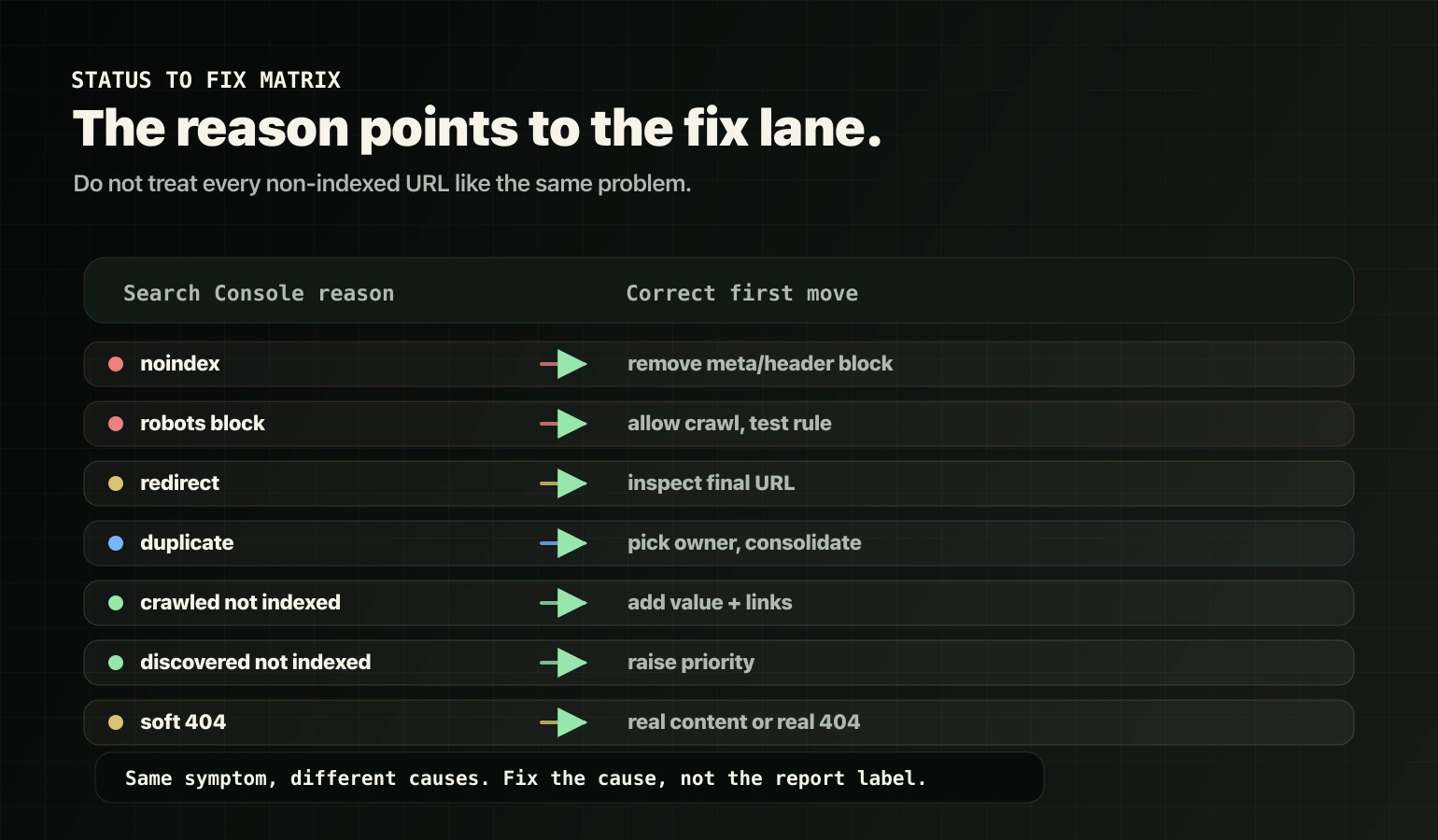
The status is not the whole diagnosis. It tells you where to start.
| Search Console status | What it usually means | Correct first move |
|---|---|---|
Excluded by noindex tag |
The page explicitly blocks indexing | Remove the meta robots or X-Robots-Tag noindex rule, then live test |
| Blocked by robots.txt | Google is blocked from crawling | Remove the blocking rule for important pages and required assets |
| Page with redirect | The inspected URL is not the final URL | Link to and inspect the final destination URL |
| Duplicate, Google chose different canonical | Google sees another URL as the better owner | Decide the owner URL, consolidate duplicates, update internal links, align canonicals |
| Crawled – currently not indexed | Google crawled it but chose not to index it | Improve unique value, reduce duplication, strengthen internal links |
| Discovered – currently not indexed | Google knows the URL but has not crawled/indexed it enough | Add strong internal links, clean sitemap signals, reduce crawl waste |
| Soft 404 | The page looks empty or useless despite returning 200 | Return a real 404 if it should not exist, or add real content and purpose |
| Alternate page with proper canonical tag | The URL is a variant and points to the canonical owner | Usually no fix; verify the canonical target is indexed |
Service-site indexing blockers teams miss
1. Too many similar service, location, or industry pages
If you have twenty URLs saying the same thing with swapped city, service, or industry labels, Google may choose a few and ignore the rest.
Fix:
- choose one owner URL per intent,
- merge or redirect duplicates,
- make real location or industry pages meaningfully different,
- stop creating new near-duplicates as a "scale" strategy.
2. Taxonomy bloat
WordPress category, tag, author, date, and archive pages can flood the site with low-value indexable URLs.
Fix:
- noindex weak archives,
- make important category pages real hubs,
- remove tag sprawl that creates thin archive pages,
- keep the sitemap focused on indexable pages.
3. Parameter and filter crawl waste
Filters, tracking parameters, search-result pages, and sort orders can create a huge URL set.
Fix:
- canonicalize cleanly,
- control low-value patterns,
- avoid internal links to junk URL variants,
- keep sitemaps clean.
4. Orphan revenue pages
If a service page is not linked from any meaningful route, it is structurally weak even if the copy is decent.
Fix:
- link from the relevant service overview or hub,
- link from support articles that answer buyer questions,
- link from proof pages when they reduce decision risk,
- make the CTA path obvious.
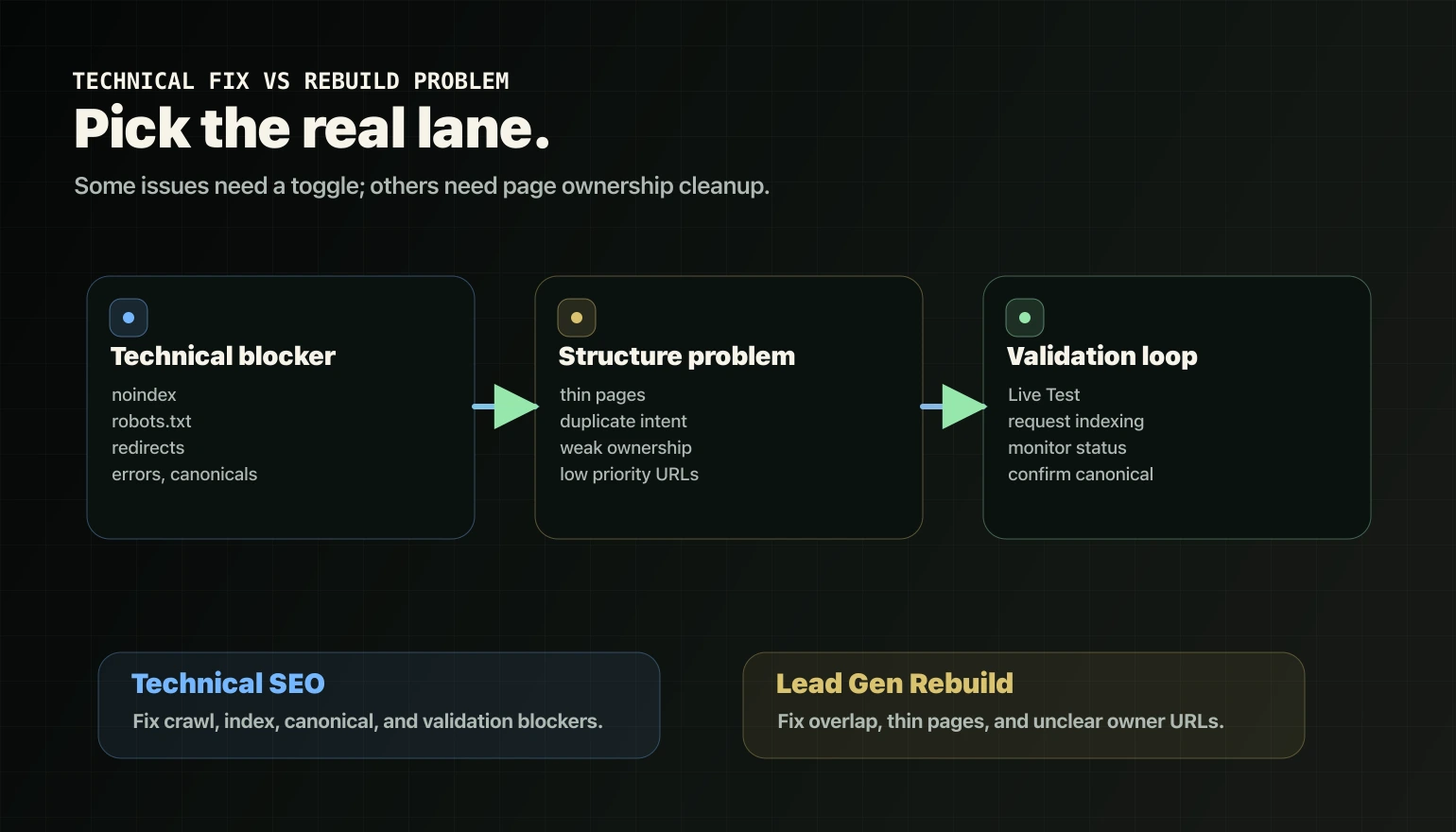
Technical fix or rebuild problem?
Use this split.
Technical fix:
- noindex,
- robots.txt block,
- redirect chain,
- 404 or soft 404,
- wrong canonical tag,
- missing sitemap inclusion,
- orphan page with no internal path.
Rebuild problem:
- page is technically indexable but thin,
- page overlaps with other service or location URLs,
- many pages compete for the same intent,
- Google chooses a different canonical because the page set is unclear,
- the site has too many low-value URL variants.
If the issue is overlap and page ownership, it is not just a technical toggle. It needs structure cleanup. That is where Website Rebuild is the stronger fit.
Validation: how to confirm the fix worked
After you make the fix:
- Re-run URL Inspection.
- Run Live Test.
- Confirm crawl allowed, page fetch, indexing allowed, and canonical signals.
- Request indexing if the live test is clean.
- Monitor the Page indexing report over the next crawl cycles.
Do not celebrate the request. Celebrate the page becoming indexable, canonicalized correctly, and actually indexed.
Schema note for this playbook
This post includes HowTo JSON-LD because the article is a real step-by-step process. Do not treat that as a Google rich-result hack. Google deprecated How-to rich results in 2023, and unused structured data has no visible effect in Google Search.
Source: Google Search Central: Changes to HowTo and FAQ rich results
Want us to diagnose the blocker?
If your important pages are not indexing, the first question is not "how do we force Google to index this?"
The first question is: what is the real blocker?
Start with a Free Clarity Call. We will tell you whether this is a technical indexing issue, a duplication problem, an ownership problem, or a foundation issue – and what to fix first.